<?xml version="1.0" encoding="utf-8"?>
<feed xmlns="http://www.w3.org/2005/Atom">
  <title>Tiny Explosions</title>
	<subtitle></subtitle>
	<link href="https://tinyexplosions.com/feed.xml" rel="self"/>
	<link href="https://tinyexplosions.com/"/>
	
	<updated>2020-05-05T00:00:00-00:00</updated>
	
	<id>https://tinyexplosions.com</id>
	<author>
  <name>Al Graham</name>
  <email>hello@tinyexplosions.com</email>
	</author>
	
  
  <entry>
    <title>Serverless on OpenShift</title>
    <link href="https://tinyexplosions.com/posts/serverless/"/>
    <updated>2020-08-26T00:00:00-00:00</updated>
    <id>https://tinyexplosions.com/posts/serverless/</id>
    <content type="html"><![CDATA[
      <p>Serverless is big these days. Everyone wants to use the likes of <a href="https://aws.amazon.com/lambda/">AWS's Lambda</a> to save some costs thanks to not paying for idle processes, to help with scaling, and cos it's the cool thing to do. Thankfully, with knative, it's now come to OpenShift, so you can get the benefits of serverless wherever OpenShift is running. Given the popularty in this functionality, I thought I'd dive in and see how quick it was to set up on my lab, and was surprised at how quick I got up and running.</p>
<h3>Enabling serverless on OpenShift</h3>
<p>The first step in going serverless on OpenShift is installing the Serverless Operator through operatorhub, making sure to install for all namespaces, on the relavant channel, with Automatic approval. <a href="https://docs.openshift.com/container-platform/4.5/serverless/installing_serverless/installing-openshift-serverless.html#serverless-install-web-console_installing-openshift-serverless">The official documentation</a> is very clear, and takes one through everything required. Once the operator is installed, I then installed knative serving and knative eventing (once again following the docs), and in just a few minutes it looked like everything was installed and working.</p>
<h3>My first service</h3>
<p>Once the Serverless Operator was installed, it was time to look at deploying an <em>actual</em> application. <a href="https://docs.openshift.com/container-platform/4.5/serverless/serving-creating-managing-apps.html#creating-serverless-applications-using-the-developer-perspective">Our Documentation</a> is a good starter, and will get you up and running with the sample 'Hello World' service in short order. However, being an awkward cuss, I wanted to try something different, and a good candidate is <a href="https://tinyexplosions.com/posts/my-first-app/">my first app</a> - it's a simple, self contained API, and is a great candidate.</p>
<p>To get up and running, I created an application is the same manner outlined in the previous post, and checked the 'Knative Service' option under the resource type to generate. Then it was build, and..... nothing. The service didn't start up correctly, even though the build had completed. It was then I remembered that my application starts up on port 3000 rather than 8080. Thankfully, this can be defined in the YAML for the Serverless Service by adding a <code>containerPort</code> declaration.</p>
<pre class="language-yaml"><code class="language-yaml"><span class="highlight-line"><span class="token key atrule">spec</span><span class="token punctuation">:</span></span><br><span class="highlight-line">  <span class="token key atrule">containers</span><span class="token punctuation">:</span></span><br><span class="highlight-line">    <span class="token key atrule">ports</span><span class="token punctuation">:</span></span><br><span class="highlight-line">      <span class="token punctuation">-</span> <span class="token key atrule">containerPort</span><span class="token punctuation">:</span> <span class="token number">3000</span></span></code></pre>
<p>Once this was added, the service completed creation, and all conditions on the service page showed up as 'True'. From there, it was a matter of hitting the URL, and seeing an Adventure Time quote returned!</p>
<h3>Performance</h3>
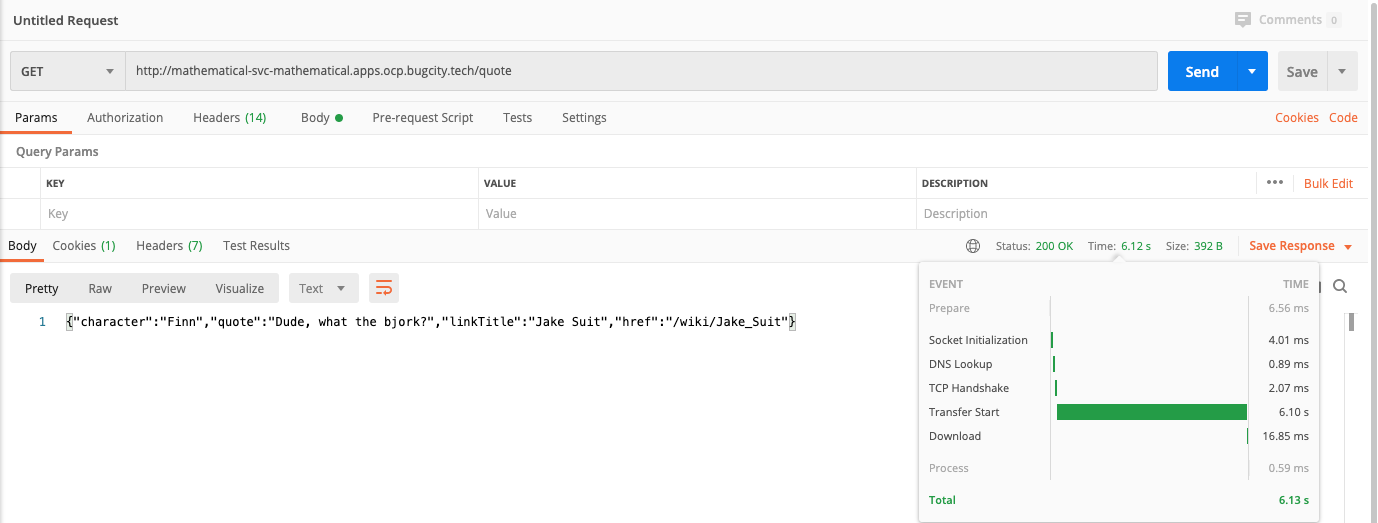
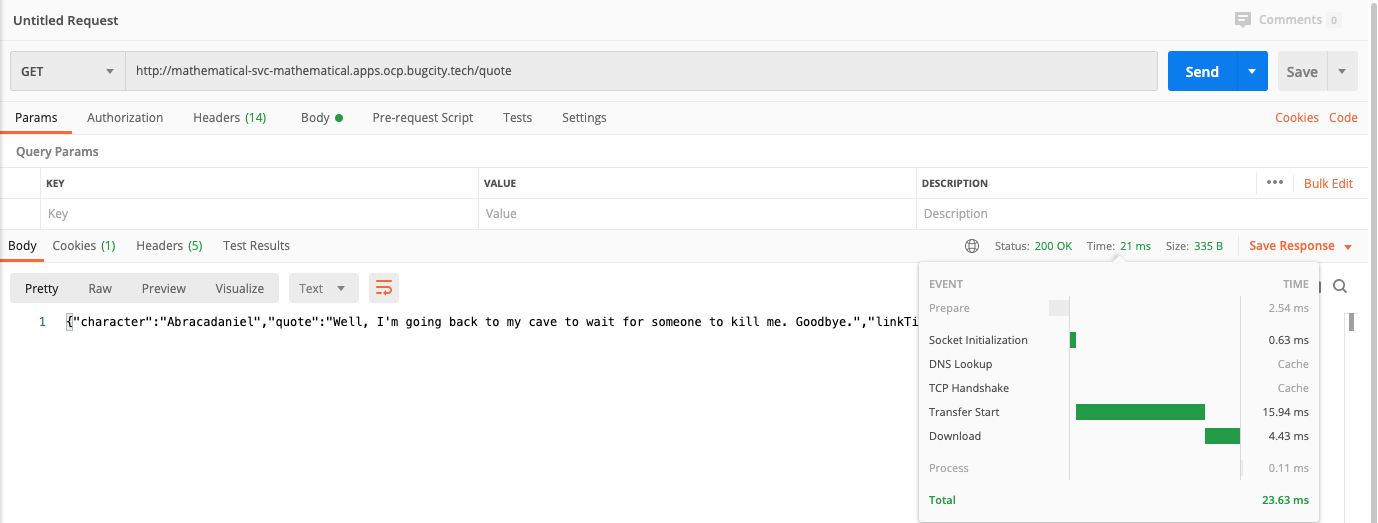
<p>We know that performance suffers with serverless and cold starts, so I thought I'd log a couple of tests to quantify it. These are individual runs, and absolutely not scientific (there may be future posts in making things perform better), but it's interesting to see that we go from 6 seconds to 21 milliseconds!</p>
<p><a href="/images/serverless-stats-cold.png"><img src="/images/serverless-stats-cold.png" alt="Postman screen capture showing cold retrieval of data from service is 6.12s" title="Cold start, so not expecting fantastic performance on this request."></a></p>
<p><a href="/images/serverless-stats-warm.png"><img src="/images/serverless-stats-warm.png" alt="Postman screen capture showing warm retrieval of data from service is 21ms" title="Performance is greatly improved when the pod is running ;)"></a></p>
<p>All in all this was a a lot more straightforward to get this up and running, and an application deployed. Kudos must go to the OpenShift team for integrating knative so well into the product, and I'll certainly be using it frequently in future.</p>

    ]]></content>
  </entry>
	
  
  <entry>
    <title>NFS, or where to store stuff on your cluster</title>
    <link href="https://tinyexplosions.com/posts/nfs/"/>
    <updated>2020-08-25T00:00:00-00:00</updated>
    <id>https://tinyexplosions.com/posts/nfs/</id>
    <content type="html"><![CDATA[
      <p><a href="/posts/persistent-storage-nfs/">My earlier post</a> on setting up NFS persistent volumes was based around my Synology, and so is of limited use to people who don't have a similar setup, so given that everything is based of RHEV it seems a good idea to create a VM and run a RHEL-based NFS server. Helps keep everything 'in the box' and is a useful pattern to have.</p>
<p>To begin, I set up a RHEL8 VM, gave it an 80GB partition because I'm being a little frugal, and set it up in my usual manner, adding the usual repos, and registering it with IDM.</p>
<pre class="language-bash"><code class="language-bash"><span class="highlight-line">subscription-manager register</span><br><span class="highlight-line">subscription-manager attach --pool<span class="token operator">=</span><span class="token operator">&lt;</span>pool id<span class="token operator">></span></span><br><span class="highlight-line">subscription-manager repos --disable<span class="token operator">=</span>*</span><br><span class="highlight-line">subscription-manager repos --enable<span class="token operator">=</span>rhel-8-for-x86_64-baseos-rpms</span><br><span class="highlight-line">subscription-manager repos --enable<span class="token operator">=</span>rhel-8-for-x86_64-appstream-rpms</span><br><span class="highlight-line">yum update</span><br><span class="highlight-line">yum <span class="token function">install</span> ipa-client -y</span><br><span class="highlight-line">ipa-client-install --enable-dns-updates</span></code></pre>
<p>Once my base system was set up, I ran <code>yum install nfs-utils</code>, but to my surprise the package is already installed, so that's a small victory \o/. The next steps are starting the service, setting it to start at boot, and checking the status, all done like so</p>
<pre class="language-bash"><code class="language-bash"><span class="highlight-line">systemctl start nfs-server.service</span><br><span class="highlight-line">systemctl <span class="token builtin class-name">enable</span> nfs-server.service</span><br><span class="highlight-line">systemctl status nfs-server.service</span></code></pre>
<p>This now gives us a running nfs server, but it's a bit useless unless we create some shares on it. THis involves creating some suitable folders on the file system, and adding it to the <code>/nfs/exports/</code> config file. I'll start with deciding that <code>/mnt/nfs</code> is a suitable directory to add my shares, and the first thing I want to store is the OpenShift registry, so I created the folder, added an entry to the exports file (which was empty), and applied it to the system, being sure to set the owner to <code>nobody</code>.</p>
<pre class="language-bash"><code class="language-bash"><span class="highlight-line"><span class="token function">mkdir</span> -p  /mnt/nfs/registry</span><br><span class="highlight-line"><span class="token function">chown</span> -R nobody: /mnt/nfs/</span><br><span class="highlight-line"><span class="token function">chmod</span> -R <span class="token number">777</span> /mnt/nfs/</span><br><span class="highlight-line"><span class="token function">vi</span> /etc/exports</span><br><span class="highlight-line"><span class="token comment">## Add this to empty exports file</span></span><br><span class="highlight-line">/mnt/nfs/registry       <span class="token number">192.168</span>.10.0/24<span class="token punctuation">(</span>rw,sync,no_all_squash,root_squash<span class="token punctuation">)</span></span><br><span class="highlight-line"><span class="token comment">## Apply this change</span></span><br><span class="highlight-line">exportfs -arv</span></code></pre>
<p>What's been created is an export that is available to everything on the 192.168.10.0/24 subnet (which is now the subnet of my lab), and allows read and write access, that NFS writes to disk when requested. To check that this has been applied, <code>exportfs  -s</code> will list all exports known to the system.</p>
<p>Finally, we want to ensure that the firewall rules allow connections, which can be achieved by the following:</p>
<pre class="language-bash"><code class="language-bash"><span class="highlight-line">firewall-cmd --permanent --add-service<span class="token operator">=</span>rpc-bind</span><br><span class="highlight-line">firewall-cmd --permanent --add-service<span class="token operator">=</span>mountd</span><br><span class="highlight-line">firewall-cmd --permanent --add-service<span class="token operator">=</span>nfs</span><br><span class="highlight-line">firewall-cmd --reload</span></code></pre>
<p>This should now give us something that OpenShift can connect to, so we need to go back over there to configure a Persistent Volume, and Claim it for the registry. For this we can follow <a href="/posts/persistent-storage-nfs/">the previous post</a>, by visiting Persistent Volumes -&gt; Create Persistent Volume in the console, and adding the following YAML to configure:</p>
<pre class="language-yaml"><code class="language-yaml"><span class="highlight-line"><span class="token key atrule">apiVersion</span><span class="token punctuation">:</span> v1</span><br><span class="highlight-line"><span class="token key atrule">kind</span><span class="token punctuation">:</span> PersistentVolume</span><br><span class="highlight-line"><span class="token key atrule">metadata</span><span class="token punctuation">:</span></span><br><span class="highlight-line">  <span class="token key atrule">name</span><span class="token punctuation">:</span> registry<span class="token punctuation">-</span>pv</span><br><span class="highlight-line"><span class="token key atrule">spec</span><span class="token punctuation">:</span></span><br><span class="highlight-line">  <span class="token key atrule">capacity</span><span class="token punctuation">:</span></span><br><span class="highlight-line">    <span class="token key atrule">storage</span><span class="token punctuation">:</span> 10Gi</span><br><span class="highlight-line">  <span class="token key atrule">accessModes</span><span class="token punctuation">:</span></span><br><span class="highlight-line">    <span class="token punctuation">-</span> ReadWriteMany</span><br><span class="highlight-line">  <span class="token key atrule">persistentVolumeReclaimPolicy</span><span class="token punctuation">:</span> Recycle</span><br><span class="highlight-line">  <span class="token key atrule">nfs</span><span class="token punctuation">:</span></span><br><span class="highlight-line">    <span class="token key atrule">server</span><span class="token punctuation">:</span> 192.168.10.26</span><br><span class="highlight-line">    <span class="token key atrule">path</span><span class="token punctuation">:</span> /mnt/nfs/registry</span></code></pre>
<p>This will create the volume with the name <code>registry-pv</code>, that is pointing to my NFS VM. The reclaim policy is set to <code>Recycle</code> so that space is freed up when a claim is deleted. This can also be set to <code>Retain</code> or <code>Delete</code> if required. In my case, I was keeping it simple so largely left things as default.</p>
<p>Once the Persistent Volume was created, I essentially have 10GB of 'space' that I want to use for the internal image registry, I need to claim sthis volume by creating a Persistent Volume Claim. In a similar manner to PVs, this can be done through the console, by visiting Persistent Volume Claims -&gt; Create Persistent Volume Claim, and adding the following YAML to configure:</p>
<pre class="language-yaml"><code class="language-yaml"><span class="highlight-line"><span class="token key atrule">apiVersion</span><span class="token punctuation">:</span> v1</span><br><span class="highlight-line"><span class="token key atrule">kind</span><span class="token punctuation">:</span> PersistentVolumeClaim</span><br><span class="highlight-line"><span class="token key atrule">metadata</span><span class="token punctuation">:</span></span><br><span class="highlight-line">  <span class="token key atrule">name</span><span class="token punctuation">:</span> registry<span class="token punctuation">-</span>pvc</span><br><span class="highlight-line">  <span class="token key atrule">namespace</span><span class="token punctuation">:</span> openshift<span class="token punctuation">-</span>image<span class="token punctuation">-</span>registry</span><br><span class="highlight-line"><span class="token key atrule">spec</span><span class="token punctuation">:</span></span><br><span class="highlight-line">  <span class="token key atrule">accessModes</span><span class="token punctuation">:</span></span><br><span class="highlight-line">    <span class="token punctuation">-</span> ReadWriteMany</span><br><span class="highlight-line">  <span class="token key atrule">resources</span><span class="token punctuation">:</span></span><br><span class="highlight-line">    <span class="token key atrule">requests</span><span class="token punctuation">:</span></span><br><span class="highlight-line">      <span class="token key atrule">storage</span><span class="token punctuation">:</span> 10Gi</span><br><span class="highlight-line">  <span class="token key atrule">storageClassName</span><span class="token punctuation">:</span> slow</span></code></pre>
<p>In order to get the internal image registry to use our new claim, we need to edit the operator, run <code>oc edit configs.imageregistry.operator.openshift.io</code>, and under the <code>spec</code> section, add the following to make the registry managed, and using the pvc.</p>
<pre class="language-yaml"><code class="language-yaml"><span class="highlight-line"><span class="token key atrule">storage</span><span class="token punctuation">:</span></span><br><span class="highlight-line">  <span class="token key atrule">pvc</span><span class="token punctuation">:</span></span><br><span class="highlight-line">    <span class="token key atrule">claim</span><span class="token punctuation">:</span> registry<span class="token punctuation">-</span>pvc</span><br><span class="highlight-line"><span class="token key atrule">replicas</span><span class="token punctuation">:</span> <span class="token number">3</span></span><br><span class="highlight-line"><span class="token key atrule">managementState</span><span class="token punctuation">:</span> Managed</span></code></pre>
<p>With that, you should be good to go, and if you build and deploy an application, you should see the images in the <code>/mnt/nfs/registry</code> directory, and all should be well.</p>

    ]]></content>
  </entry>
	
  
  <entry>
    <title>Infra Nodes in OpenShift</title>
    <link href="https://tinyexplosions.com/posts/infra-nodes/"/>
    <updated>2020-06-08T00:00:00-00:00</updated>
    <id>https://tinyexplosions.com/posts/infra-nodes/</id>
    <content type="html"><![CDATA[
      <p>Installer Provisioned Infrastructure (IPI) is undoubtedly a great way to install OpenShift. A lot of sensible defaults have been made by Red Hat, and when it completes, you get a nice cluster, with 3 master, and 3 worker nodes.</p>
<p>Infrastructure nodes were a clear concept in the days of OpenShift 3, the Control Plane was clearly split into Master and Infra nodes, and then your App nodes held all your, well, Applications. If you look at the documentation for OCP 4, you'll see that Infra nodes barely get a mention. We simply have masters and workers, and so if you inspect your nodes on a fresh install, you get:</p>
<pre class="language-bash"><code class="language-bash"><span class="highlight-line">$ oc get nodes</span><br><span class="highlight-line">NAME                       STATUS   ROLES    AGE     VERSION</span><br><span class="highlight-line">ocp-jb9nq-master-0         Ready    master   20d     v1.17.1</span><br><span class="highlight-line">ocp-jb9nq-master-1         Ready    master   20d     v1.17.1</span><br><span class="highlight-line">ocp-jb9nq-master-2         Ready    master   20d     v1.17.1</span><br><span class="highlight-line">ocp-jb9nq-worker-0-pxsfh   Ready    worker   17d     v1.17.1</span><br><span class="highlight-line">ocp-jb9nq-worker-0-t48hm   Ready    worker   20d     v1.17.1</span><br><span class="highlight-line">ocp-jb9nq-worker-0-w87sf   Ready    worker   20d     v1.17.1</span></code></pre>
<p>Why would you want to have Infra nodes? Well, the simplest reason is to put your workloads on there that are not strictly part of the Control Plane, nor are they the Applications you want to run. The main items we mean when talking of such 'Infrastructure' is the handling of Routing, the Image Registry, Metrics, and Logging. Keeping these distinct from your applications gives a good separation of concerns, as well as the fact that Infra nodes don't incur subscription charges!</p>
<p>In order to create a new type of node, we need to create a new MachineSet. This can be done by expanding 'Compute', clicking on 'Machine Sets', then the 'Create Machine Set' button. You can copy the YAML for the existing worker MachineSet, and modify it by adding a label of <code>node-role.kubernetes.io/infra: &quot;&quot;</code>, as well as modifying the role and type of the node to be infra. My config is the below:</p>
<pre class="language-yaml"><code class="language-yaml"><span class="highlight-line"><span class="token key atrule">apiVersion</span><span class="token punctuation">:</span> machine.openshift.io/v1beta1</span><br><span class="highlight-line"><span class="token key atrule">kind</span><span class="token punctuation">:</span> MachineSet</span><br><span class="highlight-line"><span class="token key atrule">metadata</span><span class="token punctuation">:</span></span><br><span class="highlight-line">  <span class="token key atrule">labels</span><span class="token punctuation">:</span></span><br><span class="highlight-line">    <span class="token key atrule">machine.openshift.io/cluster-api-cluster</span><span class="token punctuation">:</span> ocp<span class="token punctuation">-</span>jb9nq </span><br><span class="highlight-line">  <span class="token key atrule">name</span><span class="token punctuation">:</span> ocp<span class="token punctuation">-</span>jb9nq<span class="token punctuation">-</span>infra<span class="token punctuation">-</span><span class="token number">0</span></span><br><span class="highlight-line">  <span class="token key atrule">namespace</span><span class="token punctuation">:</span> openshift<span class="token punctuation">-</span>machine<span class="token punctuation">-</span>api</span><br><span class="highlight-line"><span class="token key atrule">spec</span><span class="token punctuation">:</span></span><br><span class="highlight-line">  <span class="token key atrule">replicas</span><span class="token punctuation">:</span> <span class="token number">3</span></span><br><span class="highlight-line">  <span class="token key atrule">selector</span><span class="token punctuation">:</span></span><br><span class="highlight-line">    <span class="token key atrule">matchLabels</span><span class="token punctuation">:</span></span><br><span class="highlight-line">      <span class="token key atrule">machine.openshift.io/cluster-api-cluster</span><span class="token punctuation">:</span> ocp<span class="token punctuation">-</span>jb9nq </span><br><span class="highlight-line">      <span class="token key atrule">machine.openshift.io/cluster-api-machineset</span><span class="token punctuation">:</span> ocp<span class="token punctuation">-</span>jb9nq<span class="token punctuation">-</span>infra<span class="token punctuation">-</span><span class="token number">0</span></span><br><span class="highlight-line">  <span class="token key atrule">template</span><span class="token punctuation">:</span></span><br><span class="highlight-line">    <span class="token key atrule">metadata</span><span class="token punctuation">:</span></span><br><span class="highlight-line">      <span class="token key atrule">labels</span><span class="token punctuation">:</span></span><br><span class="highlight-line">        <span class="token key atrule">machine.openshift.io/cluster-api-cluster</span><span class="token punctuation">:</span> ocp<span class="token punctuation">-</span>jb9nq </span><br><span class="highlight-line">        <span class="token key atrule">machine.openshift.io/cluster-api-machine-role</span><span class="token punctuation">:</span> infra </span><br><span class="highlight-line">        <span class="token key atrule">machine.openshift.io/cluster-api-machine-type</span><span class="token punctuation">:</span> infra </span><br><span class="highlight-line">        <span class="token key atrule">machine.openshift.io/cluster-api-machineset</span><span class="token punctuation">:</span> ocp<span class="token punctuation">-</span>jb9nq<span class="token punctuation">-</span>infra<span class="token punctuation">-</span><span class="token number">0</span> </span><br><span class="highlight-line">    <span class="token key atrule">spec</span><span class="token punctuation">:</span></span><br><span class="highlight-line">      <span class="token key atrule">metadata</span><span class="token punctuation">:</span></span><br><span class="highlight-line">        <span class="token key atrule">labels</span><span class="token punctuation">:</span></span><br><span class="highlight-line">          <span class="token key atrule">node-role.kubernetes.io/infra</span><span class="token punctuation">:</span> <span class="token string">""</span> </span><br><span class="highlight-line">      <span class="token key atrule">providerSpec</span><span class="token punctuation">:</span></span><br><span class="highlight-line">        <span class="token key atrule">value</span><span class="token punctuation">:</span></span><br><span class="highlight-line">          <span class="token key atrule">cluster_id</span><span class="token punctuation">:</span> 652f7152<span class="token punctuation">-</span>98e1<span class="token punctuation">-</span>11ea<span class="token punctuation">-</span>9fa7<span class="token punctuation">-</span>901b0e33b3aa</span><br><span class="highlight-line">          <span class="token key atrule">userDataSecret</span><span class="token punctuation">:</span></span><br><span class="highlight-line">            <span class="token key atrule">name</span><span class="token punctuation">:</span> worker<span class="token punctuation">-</span>user<span class="token punctuation">-</span>data</span><br><span class="highlight-line">          <span class="token key atrule">name</span><span class="token punctuation">:</span> <span class="token string">''</span></span><br><span class="highlight-line">          <span class="token key atrule">credentialsSecret</span><span class="token punctuation">:</span></span><br><span class="highlight-line">            <span class="token key atrule">name</span><span class="token punctuation">:</span> ovirt<span class="token punctuation">-</span>credentials</span><br><span class="highlight-line">          <span class="token key atrule">metadata</span><span class="token punctuation">:</span></span><br><span class="highlight-line">            <span class="token key atrule">creationTimestamp</span><span class="token punctuation">:</span> <span class="token null important">null</span></span><br><span class="highlight-line">          <span class="token key atrule">template_name</span><span class="token punctuation">:</span> ocp<span class="token punctuation">-</span>jb9nq<span class="token punctuation">-</span>rhcos</span><br><span class="highlight-line">          <span class="token key atrule">kind</span><span class="token punctuation">:</span> OvirtMachineProviderSpec</span><br><span class="highlight-line">          <span class="token key atrule">id</span><span class="token punctuation">:</span> <span class="token string">''</span></span><br><span class="highlight-line">          <span class="token key atrule">apiVersion</span><span class="token punctuation">:</span> ovirtproviderconfig.openshift.io/v1beta1</span></code></pre>
<p>This will create 3 replicas of my new MachineSet. Saving this file and waiting a few minutes will see RHV spin up some new VMs, assign them as Nodes and complete the configuration. If we run <code>oc get nodes</code> again, we will see the following.</p>
<pre class="language-bash"><code class="language-bash"><span class="highlight-line">NAME                       STATUS   ROLES            AGE     VERSION</span><br><span class="highlight-line">ocp-jb9nq-infra-0-2zrvd    Ready    infra, worker    3d23h   v1.17.1</span><br><span class="highlight-line">ocp-jb9nq-infra-0-rrppr    Ready    infra, worker    3d23h   v1.17.1</span><br><span class="highlight-line">ocp-jb9nq-infra-0-zq5cd    Ready    infra, worker    4d      v1.17.1</span><br><span class="highlight-line">ocp-jb9nq-master-0         Ready    master           20d     v1.17.1</span><br><span class="highlight-line">ocp-jb9nq-master-1         Ready    master           20d     v1.17.1</span><br><span class="highlight-line">ocp-jb9nq-master-2         Ready    master           20d     v1.17.1</span><br><span class="highlight-line">ocp-jb9nq-worker-0-pxsfh   Ready    worker           17d     v1.17.1</span><br><span class="highlight-line">ocp-jb9nq-worker-0-t48hm   Ready    worker           20d     v1.17.1</span><br><span class="highlight-line">ocp-jb9nq-worker-0-w87sf   Ready    worker           20d     v1.17.1</span></code></pre>
<p>So now we have 3 Infra Nodes, and just need something to run on them. The first thing we can do is move the <code>IngressController</code>. We need to edit it and modify the <code>spec</code> section to add a <code>NodeSelector</code> stanza in the following format</p>
<pre class="language-bash"><code class="language-bash"><span class="highlight-line">oc edit ingresscontroller default -n openshift-ingress-operator -o yaml</span></code></pre>
<p>replace <code>spec: {}</code> with the following - it will ensure that pods go on a node labeled as <code>infra</code></p>
<pre class="language-yaml"><code class="language-yaml"><span class="highlight-line"><span class="token key atrule">spec</span><span class="token punctuation">:</span></span><br><span class="highlight-line">    <span class="token key atrule">nodePlacement</span><span class="token punctuation">:</span></span><br><span class="highlight-line">      <span class="token key atrule">nodeSelector</span><span class="token punctuation">:</span></span><br><span class="highlight-line">        <span class="token key atrule">matchLabels</span><span class="token punctuation">:</span></span><br><span class="highlight-line">          <span class="token key atrule">node-role.kubernetes.io/infra</span><span class="token punctuation">:</span> <span class="token string">""</span></span></code></pre>
<p>You can confirm the correct nodes are in the right place by running</p>
<pre class="language-bash"><code class="language-bash"><span class="highlight-line">oc get pod -n openshift-ingress -o wide</span></code></pre>
<p>To move the default registry, it is a similar pattern - first by editing the <code>config/instance</code> object</p>
<pre class="language-bash"><code class="language-bash"><span class="highlight-line">oc edit config/cluster</span></code></pre>
<p>And adding the following in the <code>spec</code></p>
<pre class="language-yaml"><code class="language-yaml"><span class="highlight-line"><span class="token key atrule">nodeSelector</span><span class="token punctuation">:</span></span><br><span class="highlight-line">    <span class="token key atrule">node-role.kubernetes.io/infra</span><span class="token punctuation">:</span> <span class="token string">""</span></span></code></pre>
<p>Once again, this can be verified by running</p>
<pre class="language-bash"><code class="language-bash"><span class="highlight-line">oc get pods -o wide -n openshift-image-registry</span></code></pre>
<p>To move monitoring, we need to create a ConfigMap</p>
<pre class="language-yaml"><code class="language-yaml"><span class="highlight-line"><span class="token key atrule">apiVersion</span><span class="token punctuation">:</span> v1</span><br><span class="highlight-line"><span class="token key atrule">kind</span><span class="token punctuation">:</span> ConfigMap</span><br><span class="highlight-line"><span class="token key atrule">metadata</span><span class="token punctuation">:</span></span><br><span class="highlight-line">  <span class="token key atrule">name</span><span class="token punctuation">:</span> cluster<span class="token punctuation">-</span>monitoring<span class="token punctuation">-</span>config</span><br><span class="highlight-line">  <span class="token key atrule">namespace</span><span class="token punctuation">:</span> openshift<span class="token punctuation">-</span>monitoring</span><br><span class="highlight-line"><span class="token key atrule">data</span><span class="token punctuation">:</span></span><br><span class="highlight-line">  <span class="token key atrule">config.yaml</span><span class="token punctuation">:</span> <span class="token punctuation">|</span>+</span><br><span class="highlight-line">    <span class="token key atrule">alertmanagerMain</span><span class="token punctuation">:</span></span><br><span class="highlight-line">      <span class="token key atrule">nodeSelector</span><span class="token punctuation">:</span></span><br><span class="highlight-line">        <span class="token key atrule">node-role.kubernetes.io/infra</span><span class="token punctuation">:</span> <span class="token string">""</span></span><br><span class="highlight-line">    <span class="token key atrule">prometheusK8s</span><span class="token punctuation">:</span></span><br><span class="highlight-line">      <span class="token key atrule">nodeSelector</span><span class="token punctuation">:</span></span><br><span class="highlight-line">        <span class="token key atrule">node-role.kubernetes.io/infra</span><span class="token punctuation">:</span> <span class="token string">""</span></span><br><span class="highlight-line">    <span class="token key atrule">prometheusOperator</span><span class="token punctuation">:</span></span><br><span class="highlight-line">      <span class="token key atrule">nodeSelector</span><span class="token punctuation">:</span></span><br><span class="highlight-line">        <span class="token key atrule">node-role.kubernetes.io/infra</span><span class="token punctuation">:</span> <span class="token string">""</span></span><br><span class="highlight-line">    <span class="token key atrule">grafana</span><span class="token punctuation">:</span></span><br><span class="highlight-line">      <span class="token key atrule">nodeSelector</span><span class="token punctuation">:</span></span><br><span class="highlight-line">        <span class="token key atrule">node-role.kubernetes.io/infra</span><span class="token punctuation">:</span> <span class="token string">""</span></span><br><span class="highlight-line">    <span class="token key atrule">k8sPrometheusAdapter</span><span class="token punctuation">:</span></span><br><span class="highlight-line">      <span class="token key atrule">nodeSelector</span><span class="token punctuation">:</span></span><br><span class="highlight-line">        <span class="token key atrule">node-role.kubernetes.io/infra</span><span class="token punctuation">:</span> <span class="token string">""</span></span><br><span class="highlight-line">    <span class="token key atrule">kubeStateMetrics</span><span class="token punctuation">:</span></span><br><span class="highlight-line">      <span class="token key atrule">nodeSelector</span><span class="token punctuation">:</span></span><br><span class="highlight-line">        <span class="token key atrule">node-role.kubernetes.io/infra</span><span class="token punctuation">:</span> <span class="token string">""</span></span><br><span class="highlight-line">    <span class="token key atrule">telemeterClient</span><span class="token punctuation">:</span></span><br><span class="highlight-line">      <span class="token key atrule">nodeSelector</span><span class="token punctuation">:</span></span><br><span class="highlight-line">        <span class="token key atrule">node-role.kubernetes.io/infra</span><span class="token punctuation">:</span> <span class="token string">""</span></span><br><span class="highlight-line">    <span class="token key atrule">openshiftStateMetrics</span><span class="token punctuation">:</span></span><br><span class="highlight-line">      <span class="token key atrule">nodeSelector</span><span class="token punctuation">:</span></span><br><span class="highlight-line">        <span class="token key atrule">node-role.kubernetes.io/infra</span><span class="token punctuation">:</span> <span class="token string">""</span></span></code></pre>
<p>Applying the above can be done ising <code>oc create</code></p>
<pre class="language-bash"><code class="language-bash"><span class="highlight-line">oc create -f cluster-monitoring-configmap.yaml</span></code></pre>
<p>After a few minutes, you can check that the pods are in the correct place with the following command</p>
<pre class="language-bash"><code class="language-bash"><span class="highlight-line">oc get pod -n openshift-monitoring -o wide</span></code></pre>
<p>The <a href="https://docs.openshift.com/container-platform/4.4/machine_management/creating-infrastructure-machinesets.html#infrastructure-moving-logging_creating-infrastructure-machinesets">OpenShift documentation</a> for moving cluster logging resources is quite comprehensive, and worth following (as it is for the moving of other resources described above).</p>
<p>You may notice then when creating the nodes, they will all have the role of <code>infra, worker</code>. This does mean that there is the possibility that Application workloads could get put on the nodes. If you want to remove the worker label, <code>oc label node &lt;node name&gt; node-role.kubernetes.io/worker-</code> will do it for you.</p>

    ]]></content>
  </entry>
	
  
  <entry>
    <title>Persistent Storage (NFS flavour)</title>
    <link href="https://tinyexplosions.com/posts/persistent-storage-nfs/"/>
    <updated>2020-06-01T00:00:00-00:00</updated>
    <id>https://tinyexplosions.com/posts/persistent-storage-nfs/</id>
    <content type="html"><![CDATA[
      <p>After our little sojourn into app dev yesterday, it's dropping back to infrastructure today to talk Persistent Volumes (PV's) and Persistent Volume Claims (PVC's). <s>For the uninitiated, a PV is like your big disk, and each PVC claims a certain part of that, kind of like a folder.</s> <em>It turns out that my analogy, and knowledge of PV's and PVC's was very wrong - see addendum below</em> While all the kids these days love talking about 'ephemeral' and 'stateless' apps, having some amount of persistent storage is useful for a variety of usecases - not least of which is for an Image Registry.</p>
<p>So, it was time for PV's, but what which one to choose? Given that my cluster is running on RHV, I could spin up a drive or some space on there, but that seemed a little complicated in many ways, so my eyes turned to my NAS... well, it does have 'Storage' as part of it's acronym... I have a Synology DS218+ to hold media, but it has plenty of spare space on it, so lets get adding an NFS share to it.</p>
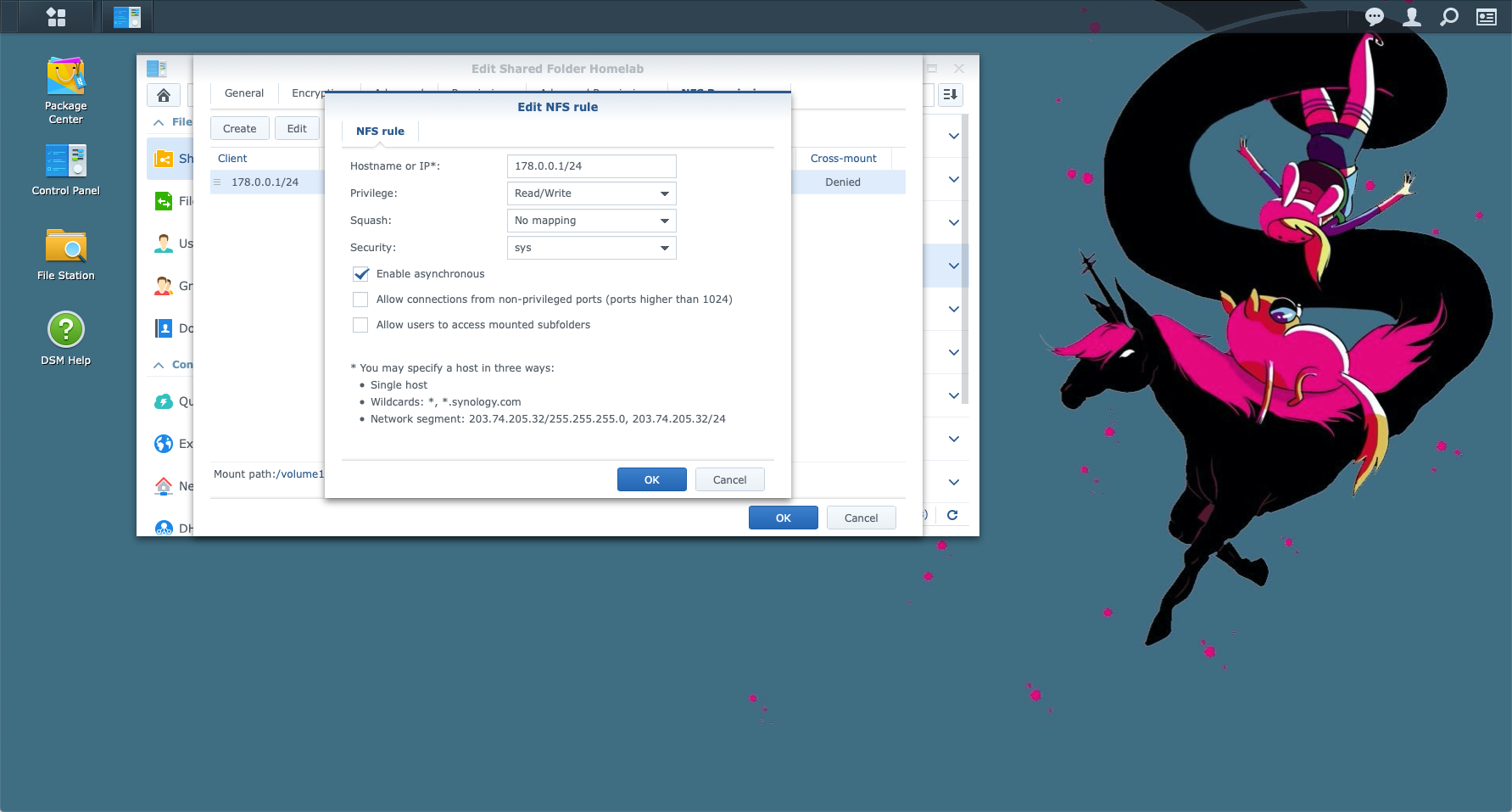
<p><a href="https://www.synology.com/en-us/knowledgebase/DSM/tutorial/File_Sharing/How_to_access_files_on_Synology_NAS_within_the_local_network_NFS">The Synology documentation</a> gives a really good overview, and following that I carved out a 50GB share, tied to the subnet of my lab. There are many other authentication options that can be used, but for now I'm going with simple (complexity can be added later.)</p>
<p><a href="/images/nfs-creation.png"><img src="/images/nfs-creation.png" alt="Synology NFS configuration screen"></a></p>
<p>Once this was in place, it was over to OpenShift to create Persistent Volume. This can be done through the ui, by visiting Persistent Volumes -&gt; Create Persistent Volume in the console, and adding the following YAML to configure:</p>
<pre class="language-yaml"><code class="language-yaml"><span class="highlight-line"><span class="token key atrule">apiVersion</span><span class="token punctuation">:</span> v1</span><br><span class="highlight-line"><span class="token key atrule">kind</span><span class="token punctuation">:</span> PersistentVolume</span><br><span class="highlight-line"><span class="token key atrule">metadata</span><span class="token punctuation">:</span></span><br><span class="highlight-line">  <span class="token key atrule">name</span><span class="token punctuation">:</span> synology</span><br><span class="highlight-line"><span class="token key atrule">spec</span><span class="token punctuation">:</span></span><br><span class="highlight-line">  <span class="token key atrule">capacity</span><span class="token punctuation">:</span></span><br><span class="highlight-line">    <span class="token key atrule">storage</span><span class="token punctuation">:</span> 50Gi</span><br><span class="highlight-line">  <span class="token key atrule">accessModes</span><span class="token punctuation">:</span></span><br><span class="highlight-line">    <span class="token punctuation">-</span> ReadWriteOnce</span><br><span class="highlight-line">  <span class="token key atrule">persistentVolumeReclaimPolicy</span><span class="token punctuation">:</span> Recycle</span><br><span class="highlight-line">  <span class="token key atrule">storageClassName</span><span class="token punctuation">:</span> slow</span><br><span class="highlight-line">  <span class="token key atrule">nfs</span><span class="token punctuation">:</span></span><br><span class="highlight-line">    <span class="token key atrule">server</span><span class="token punctuation">:</span> 192.168.0.200</span><br><span class="highlight-line">    <span class="token key atrule">path</span><span class="token punctuation">:</span> /volume1/Homelab</span></code></pre>
<p>This will create the volume with the name <code>synology</code>, that is pointing to my NFS mount point (<code>/volume1/Homelab on 192.168.0.200</code>). The reclaim policy is set to <code>Recycle</code> so that space is freed up when a claim is deleted. This can also be set to <code>Retain</code> or <code>Delete</code> if required. In my case, I was keeping it simple so largely left things as default.</p>
<p>Once the Persistent Volume was created, I essentially have 50GB of 'space' that I can use to store things. If I want to use any of that for an application, or for the internal image registry, I need to claim some of that volume. That is done by creating a Persistent Volume Claim. In a similar manner to PVs, this can be done through the console, by visiting Persistent Volume Claims -&gt; Create Persistent Volume Claim, and adding the following YAML to configure:</p>
<pre class="language-yaml"><code class="language-yaml"><span class="highlight-line"><span class="token key atrule">apiVersion</span><span class="token punctuation">:</span> v1</span><br><span class="highlight-line"><span class="token key atrule">kind</span><span class="token punctuation">:</span> PersistentVolumeClaim</span><br><span class="highlight-line"><span class="token key atrule">metadata</span><span class="token punctuation">:</span></span><br><span class="highlight-line">  <span class="token key atrule">name</span><span class="token punctuation">:</span> synology<span class="token punctuation">-</span>pvc<span class="token punctuation">-</span>images</span><br><span class="highlight-line">  <span class="token key atrule">namespace</span><span class="token punctuation">:</span> psychic<span class="token punctuation">-</span>octopus</span><br><span class="highlight-line"><span class="token key atrule">spec</span><span class="token punctuation">:</span></span><br><span class="highlight-line">  <span class="token key atrule">accessModes</span><span class="token punctuation">:</span></span><br><span class="highlight-line">    <span class="token punctuation">-</span> ReadWriteOnce</span><br><span class="highlight-line">  <span class="token key atrule">resources</span><span class="token punctuation">:</span></span><br><span class="highlight-line">    <span class="token key atrule">requests</span><span class="token punctuation">:</span></span><br><span class="highlight-line">      <span class="token key atrule">storage</span><span class="token punctuation">:</span> 5Gi</span><br><span class="highlight-line">  <span class="token key atrule">storageClassName</span><span class="token punctuation">:</span> slow</span></code></pre>
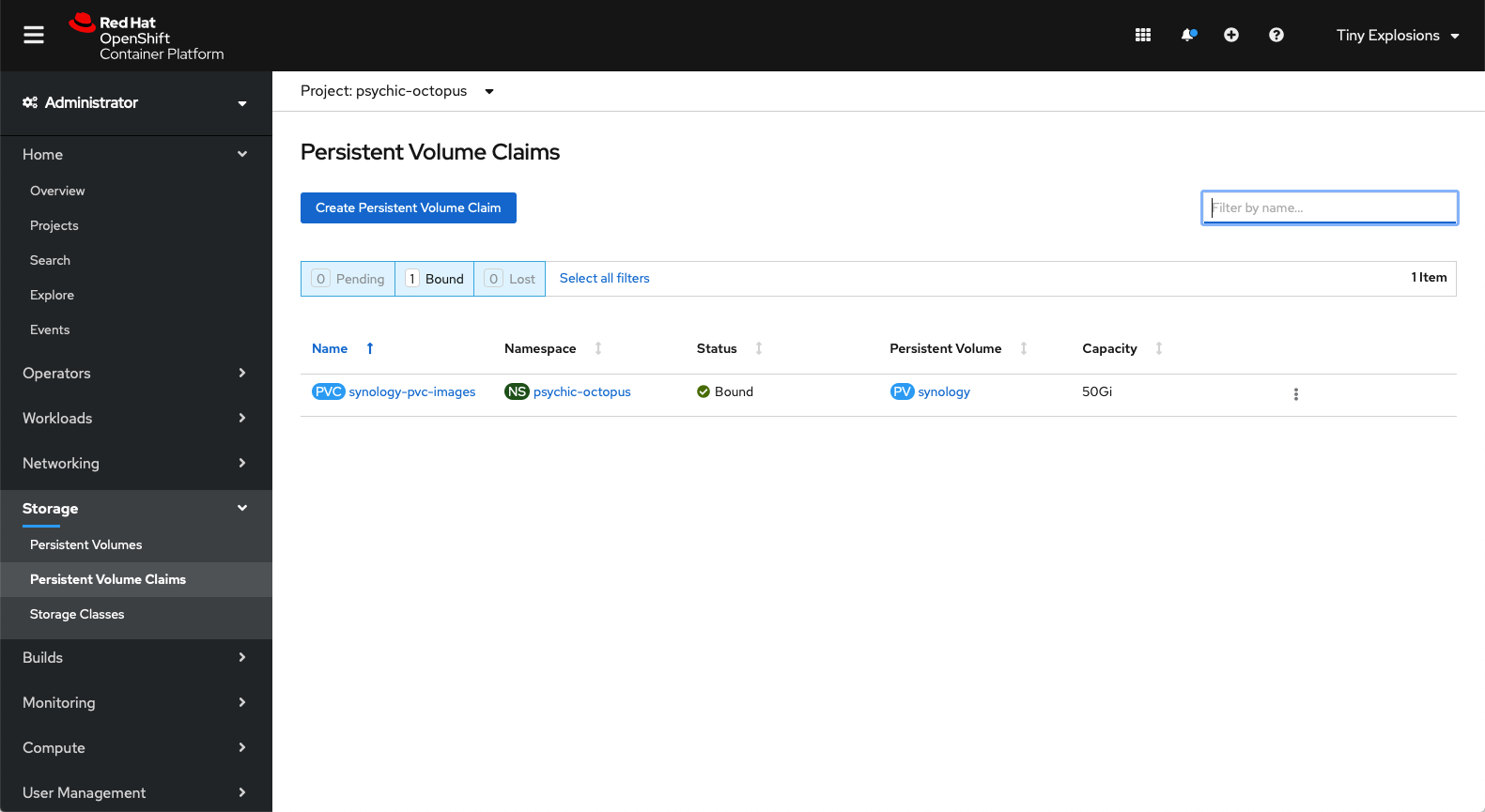
<p>This is creating a claim called <code>synology-pcvc-images</code> and I'm specifying that it is 5GB in size. I also add <code>storageClassName: slow</code> to help reference it back to the PV created before. Saving the YAML file and waiting a few seconds should leave you with a result similar to below, with my PVC Bound to the correct PV.</p>
<p><a href="/images/pvc-success.png"><img src="/images/pvc-success.png" alt="OpenShift PVC screen showing correctly bound Claim"></a></p>
<p><s>You might notice in the screenshot above that it is a little misleading. Or at least, it was to me before checking with a colleague. The 'Capacity 50Gi' looked very wrong - that was the entirety of the PV, but I had only specified 5Gi in my configuration. It would seem that this little nugget refers to the face that it can expand <em>up to</em> 50Gi if it needs to, but verifying the YAML for the claim shows that 5Gi is correctly specified as it's size.</s></p>
<p>So there you have it - my cluster is now able to save stuff on my NAS - maybe the next step is hooking the claim up to the image registry... look out for that in a future installment.</p>
<h3>Update</h3>
<p>It turns out, like so many things in life, that storage in OpenShift is not as easy as I might have thought, or the above might have led you to believe. In fact, PV's and PVC's have a 1 &lt;-&gt; 1 relationship, and so in my example above, all I have done is created a 50GB folder for my images. Useful, but certainly not the intention when I set out. If I wanted more 'folders' or space for applications, using the method above I would have to create more PV's and more PVC's.</p>
<p>What I <em>actually</em> intended to do was to provision dynamic storage, probably through a <code>StorageClass</code> but it turns out <a href="https://docs.openshift.com/container-platform/4.4/storage/dynamic-provisioning.html">this doesn't currently exist for NFS</a>. So some more research is required on this one.</p>

    ]]></content>
  </entry>
	
  
  <entry>
    <title>My First App</title>
    <link href="https://tinyexplosions.com/posts/my-first-app/"/>
    <updated>2020-05-31T00:00:00-00:00</updated>
    <id>https://tinyexplosions.com/posts/my-first-app/</id>
    <content type="html"><![CDATA[
      <p>So, now I have a shiny cluster up and (mostly/hopefully) running, I'm getting into familar territory - application development and deployment on top of OpenShift. That doesn't mean that there won't be more adventures in Infrastructure as I paly around with it more, and it also doesn't mean we're going to jump to large, complex application deployments. Partly because I don't like complicated, and partly because the rest of the articles have started from zero knowledge, so I might as well do the same for building things on the new cluster. With that in mind, lets make something.</p>
<p>Normally, most beginner series starts with a 'Hello World' demonstration. It's ubiquitous, but it's also boring, so I'm not going to do that. Ok, so I have longer term reasons as well for not doing it, but bear with. No, in this case we're going to go straight in with a quotation generator. Not just any quotation generator, but one that takes quotes from one of the best cartoons ever, <a href="https://en.wikipedia.org/wiki/Adventure_Time">Adventure Time</a>.</p>
<p>We'll also be using Node.js, in a move that will surprise nobody who I work with. Simply put, it's a straightforward language to learn, it's easy to get results quickly, and doesn't require a complex build stack or lots of configuration to both develop locally, or push to 'the cloud'. Other languages are available, but this is what we're using today.</p>
<p>We're going to create a little api. A very little api. A single endpoint in fact. You'll hit <code>&lt;url&gt;/quote</code> and there'll be a little JSON object of joy containing a nice quote from the show, and some metadata that we'll get into. The dataset is one that I built up ages ago (so in't entirely up to date with the show), and <a href="https://gist.github.com/TinyExplosions/520aa19f18d4b33b61cccd46ca1e537a">is a public gist</a> that you can grab if you wish. Other than that, we will use <a href="https://www.fastify.io">fastify</a>, a lovely little web framework for Node.js.</p>
<p>The code for the entire app is below.</p>
<pre class="language-js"><code class="language-js"><span class="highlight-line"><span class="token keyword">const</span> quotes <span class="token operator">=</span> <span class="token function">require</span><span class="token punctuation">(</span><span class="token string">'./data/adventure-time-quotes.json'</span><span class="token punctuation">)</span><span class="token punctuation">;</span></span><br><span class="highlight-line"><span class="token keyword">const</span> fastify <span class="token operator">=</span> <span class="token function">require</span><span class="token punctuation">(</span><span class="token string">'fastify'</span><span class="token punctuation">)</span><span class="token punctuation">(</span><span class="token punctuation">{</span>logger<span class="token operator">:</span> <span class="token boolean">true</span><span class="token punctuation">}</span><span class="token punctuation">)</span><span class="token punctuation">;</span></span><br><span class="highlight-line"></span><br><span class="highlight-line">fastify<span class="token punctuation">.</span><span class="token function">get</span><span class="token punctuation">(</span><span class="token string">'/quote'</span><span class="token punctuation">,</span> <span class="token keyword">function</span><span class="token punctuation">(</span><span class="token parameter">request<span class="token punctuation">,</span> reply</span><span class="token punctuation">)</span> <span class="token punctuation">{</span></span><br><span class="highlight-line">    <span class="token keyword">return</span> reply<span class="token punctuation">.</span><span class="token function">send</span><span class="token punctuation">(</span><span class="token constant">JSON</span><span class="token punctuation">.</span><span class="token function">stringify</span><span class="token punctuation">(</span>quotes<span class="token punctuation">[</span>Math<span class="token punctuation">.</span><span class="token function">floor</span><span class="token punctuation">(</span>Math<span class="token punctuation">.</span><span class="token function">random</span><span class="token punctuation">(</span><span class="token punctuation">)</span> <span class="token operator">*</span> quotes<span class="token punctuation">.</span>length<span class="token punctuation">)</span><span class="token punctuation">]</span><span class="token punctuation">)</span><span class="token punctuation">)</span><span class="token punctuation">;</span></span><br><span class="highlight-line"><span class="token punctuation">}</span><span class="token punctuation">)</span><span class="token punctuation">;</span></span><br><span class="highlight-line"></span><br><span class="highlight-line">fastify<span class="token punctuation">.</span><span class="token function">listen</span><span class="token punctuation">(</span><span class="token number">8080</span><span class="token punctuation">,</span> <span class="token string">'0.0.0.0'</span><span class="token punctuation">,</span> <span class="token keyword">function</span><span class="token punctuation">(</span><span class="token parameter">err<span class="token punctuation">,</span> address</span><span class="token punctuation">)</span> <span class="token punctuation">{</span></span><br><span class="highlight-line">    <span class="token keyword">if</span> <span class="token punctuation">(</span>err<span class="token punctuation">)</span> <span class="token punctuation">{</span></span><br><span class="highlight-line">        fastify<span class="token punctuation">.</span>log<span class="token punctuation">.</span><span class="token function">error</span><span class="token punctuation">(</span>err<span class="token punctuation">)</span></span><br><span class="highlight-line">        process<span class="token punctuation">.</span><span class="token function">exit</span><span class="token punctuation">(</span><span class="token number">1</span><span class="token punctuation">)</span></span><br><span class="highlight-line">    <span class="token punctuation">}</span></span><br><span class="highlight-line">    fastify<span class="token punctuation">.</span>log<span class="token punctuation">.</span><span class="token function">info</span><span class="token punctuation">(</span><span class="token template-string"><span class="token template-punctuation string">`</span><span class="token string">server listening on </span><span class="token interpolation"><span class="token interpolation-punctuation punctuation">${</span>address<span class="token interpolation-punctuation punctuation">}</span></span><span class="token template-punctuation string">`</span></span><span class="token punctuation">)</span></span><br><span class="highlight-line"><span class="token punctuation">}</span><span class="token punctuation">)</span><span class="token punctuation">;</span></span></code></pre>
<ul>
<li>First, we include our <code>adventure-time-quotes.json</code> file, that is in a folder named 'data'.</li>
<li>We instantiate fastifiy, our web framework.</li>
<li>We create our <code>/quote</code> route, which returns a random entry from <code>adventure-time-quotes.json</code>.</li>
<li>We start our server on port 8080 (which is the default in OpenShift), and <code>0.0.0.0</code> means it'll listen on any ip interface.</li>
</ul>
<p>In order to run our code, we need a <code>package.json</code> file, which lays out dependencies, and the various run commands. You can run <code>npm init</code> in your applications folder for an interactive creation of the file, or copy out something like below</p>
<pre class="language-json"><code class="language-json"><span class="highlight-line"><span class="token punctuation">{</span></span><br><span class="highlight-line">  <span class="token property">"name"</span><span class="token operator">:</span> <span class="token string">"adventure-time-quoter"</span><span class="token punctuation">,</span></span><br><span class="highlight-line">  <span class="token property">"version"</span><span class="token operator">:</span> <span class="token string">"1.0.0"</span><span class="token punctuation">,</span></span><br><span class="highlight-line">  <span class="token property">"description"</span><span class="token operator">:</span> <span class="token string">"The best quotes from the best show!"</span><span class="token punctuation">,</span></span><br><span class="highlight-line">  <span class="token property">"main"</span><span class="token operator">:</span> <span class="token string">"index.js"</span><span class="token punctuation">,</span></span><br><span class="highlight-line">  <span class="token property">"scripts"</span><span class="token operator">:</span> <span class="token punctuation">{</span></span><br><span class="highlight-line">    <span class="token property">"start"</span><span class="token operator">:</span> <span class="token string">"node --use_strict index.js"</span></span><br><span class="highlight-line">  <span class="token punctuation">}</span><span class="token punctuation">,</span></span><br><span class="highlight-line">  <span class="token property">"author"</span><span class="token operator">:</span> <span class="token string">"Al Graham"</span><span class="token punctuation">,</span></span><br><span class="highlight-line">  <span class="token property">"dependencies"</span><span class="token operator">:</span> <span class="token punctuation">{</span></span><br><span class="highlight-line">    <span class="token property">"fastify"</span><span class="token operator">:</span> <span class="token string">"^2.14.1"</span></span><br><span class="highlight-line">  <span class="token punctuation">}</span></span><br><span class="highlight-line"><span class="token punctuation">}</span></span></code></pre>
<p>The important parts in this are that we have <code>fastify</code> with a version of <code>^2.14.1</code> declared as a dependency - <code>^</code> is used to pull the latest major version of fastify that is equal to or greater than 2.14.1 (so in future it would pull 2.14.3, or 2.20.2, but never 3.x.y), and our main start command is <code>node --use_strict index.js</code>. This is the command that will be run by OpenShift to get your pod to start. You can test locally by running <code>npm start</code> and if you have everything correct, you'll be able to get quotes to your hearts content - but that's not on OpenShift. For that, we need to do a little more.</p>
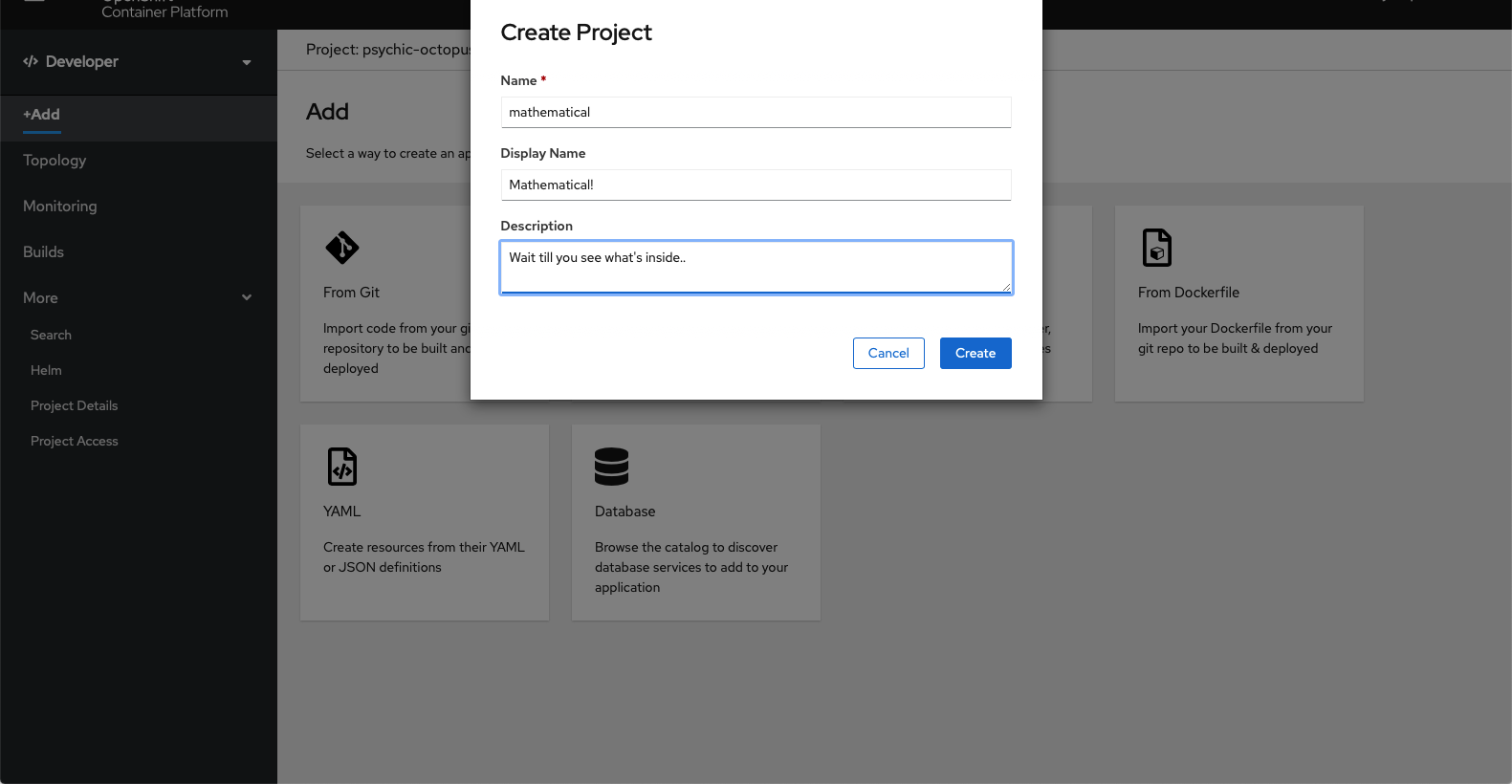
<p>We need to create a project to house our apis. This can be done through the web console by going to the Developer area, and clicking on '+Add', and then selecting 'Create Project' from the Project's dropdown, and filling in some basic details</p>
<p><a href="/images/new-app-1.png"><img src="/images/new-app-1.png" alt="OpenShift create project dialog"></a></p>
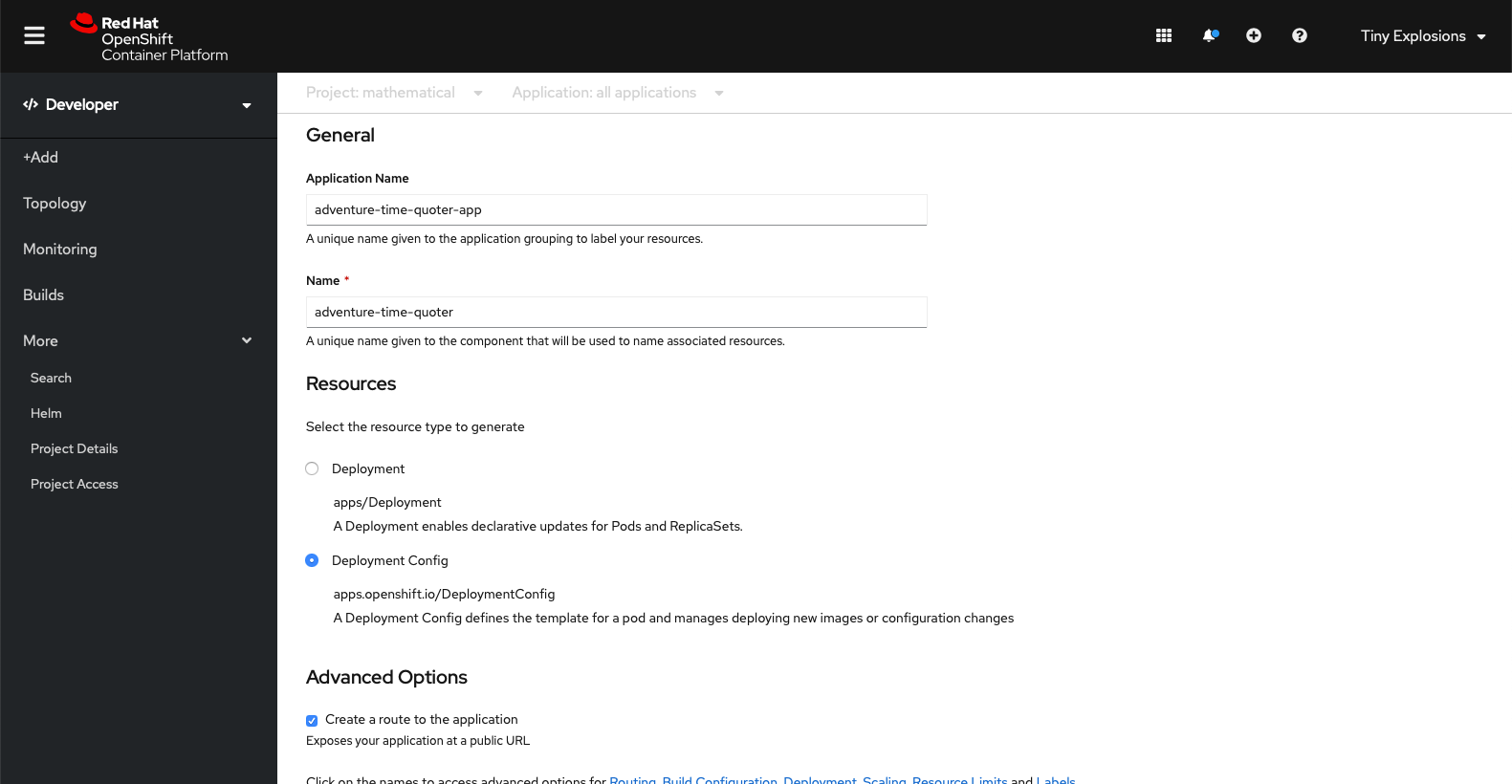
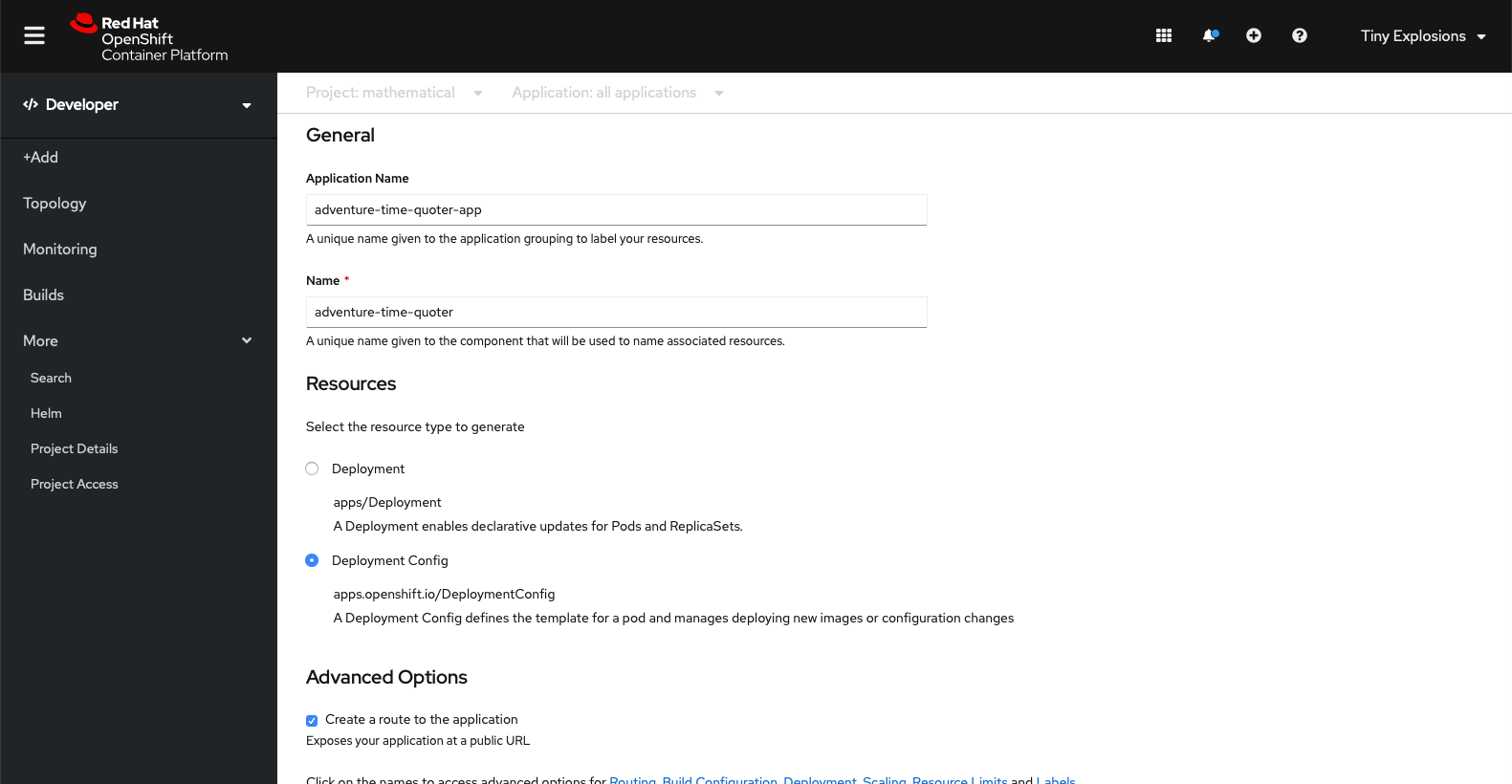
<p>Then we can add a workload from Git, and fill in our repository details, select Node.js for our builder image, give it a name within OpenShift, and create a Deployment Config</p>
<p><a href="/images/new-app-2.png"><img src="/images/new-app-2.png" alt="OpenShift create workload from git repo"></a></p>
<p><a href="/images/new-app-3.png"><img src="/images/new-app-3.png" alt="OpenShift create workload from git repo cont."></a></p>
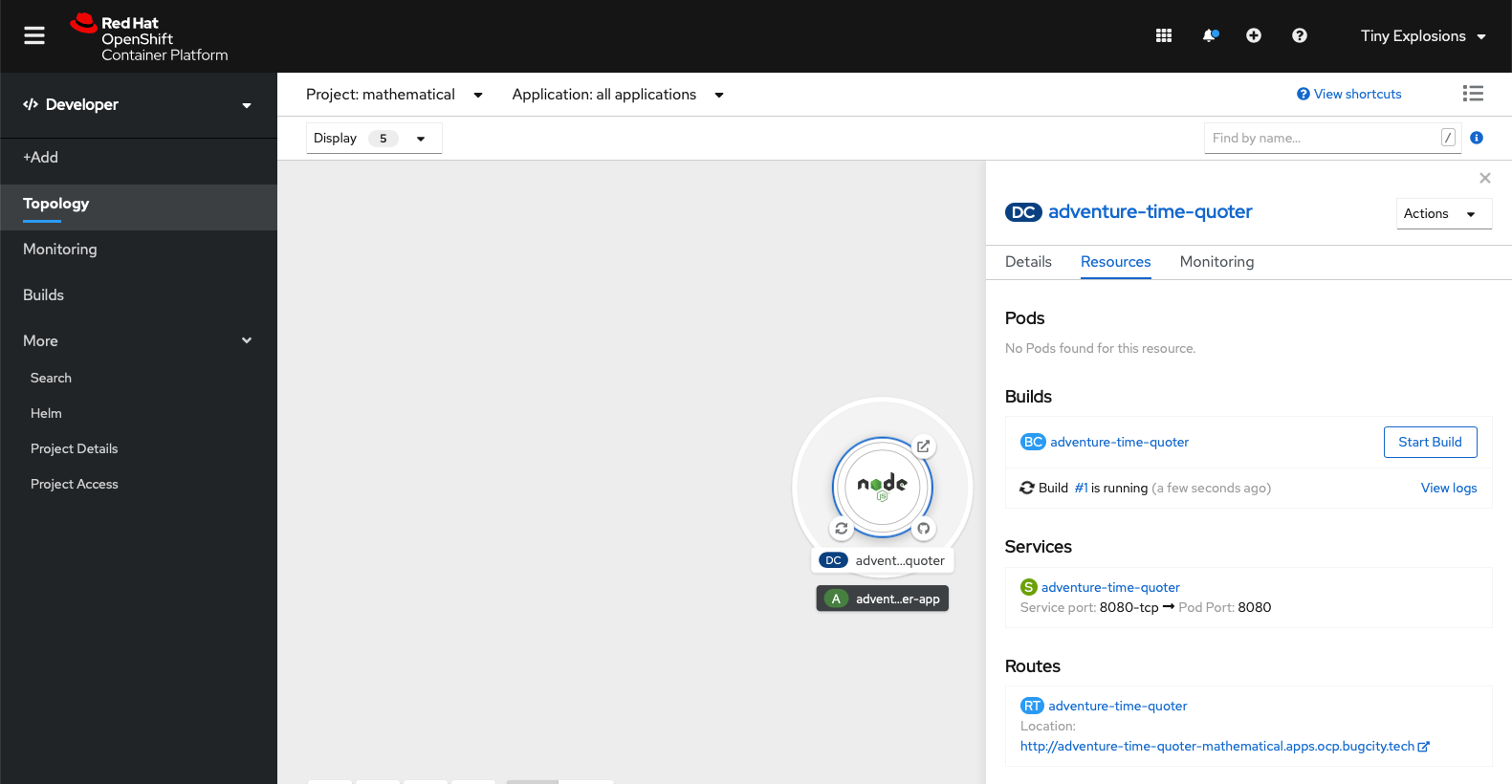
<p>Once you click 'Create', you have basically finished. Your application will be created, and you will see a cute little graphic representing it. Clicking on it expands some detailed information. In the below, you will see that the first build has just been started (this is automatically started when you add your application)</p>
<p><a href="/images/new-app-4.png"><img src="/images/new-app-4.png" alt="OpenShift application showing build started"></a></p>
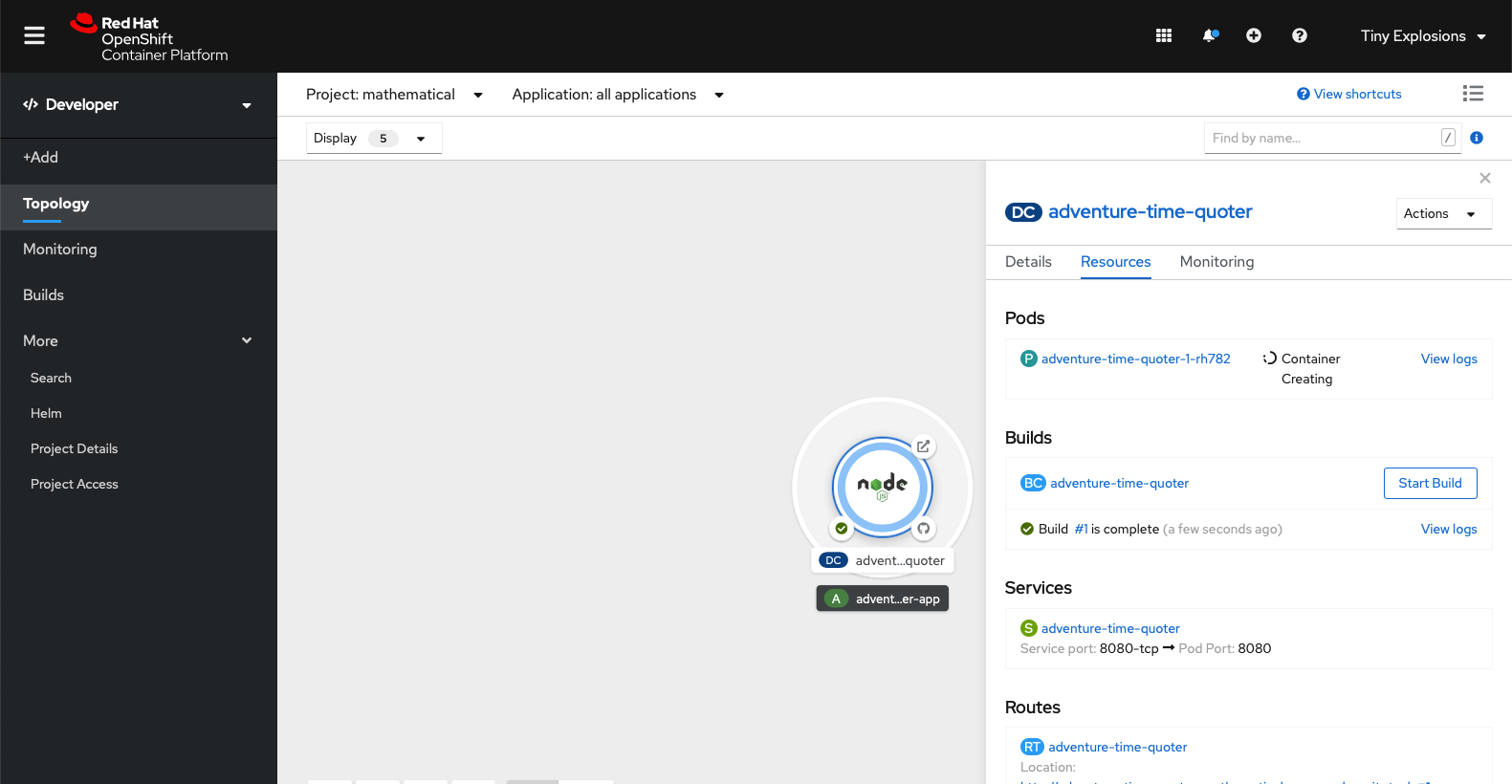
<p>When the build finishes, and if it is successful (it should be successful), the ui will change to show that the application container is being created</p>
<p><a href="/images/new-app-5.png"><img src="/images/new-app-5.png" alt="OpenShift application showing container is being created"></a></p>
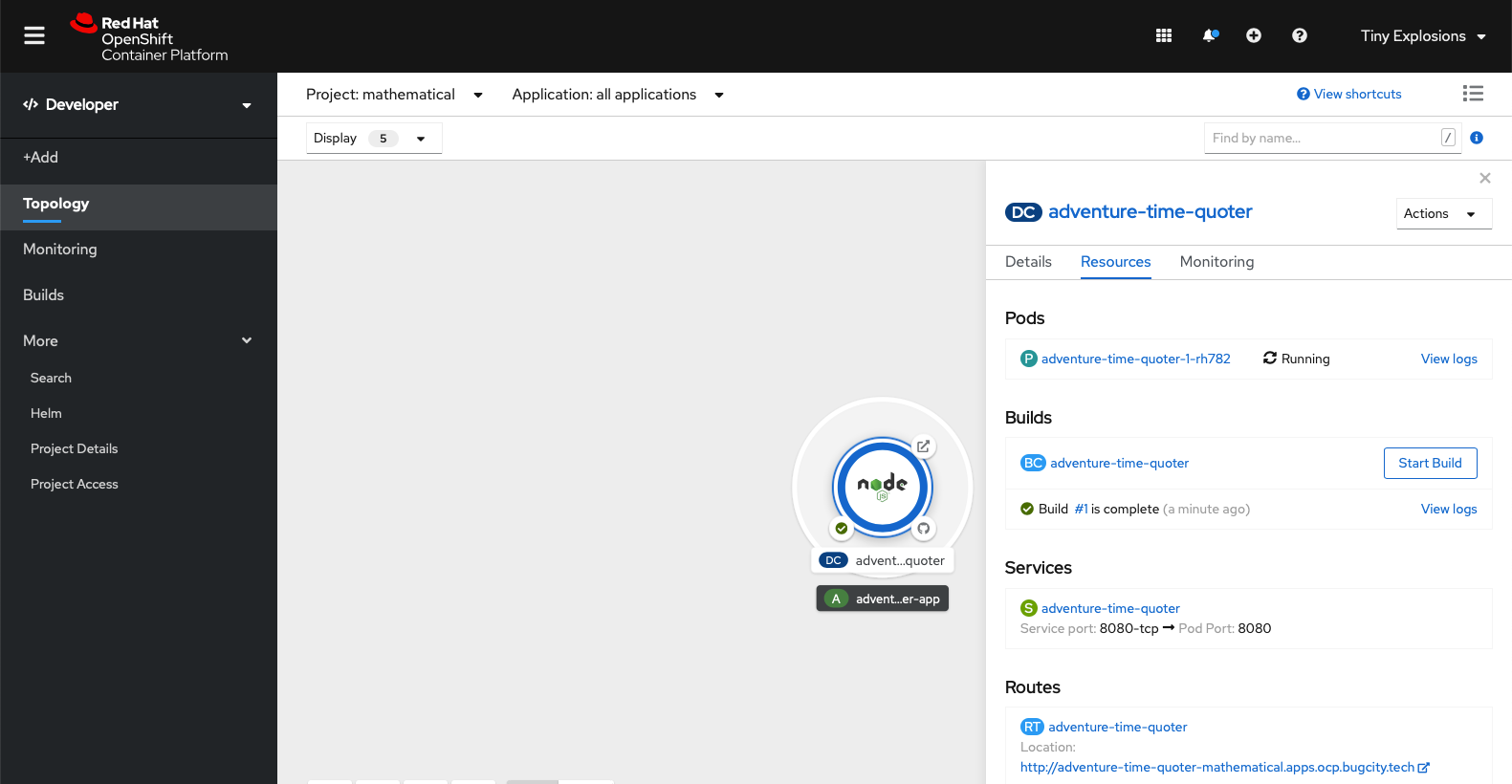
<p>When the creation has finished, you will see you container is running, and you should be able to access the route that was exposed.</p>
<p><a href="/images/new-app-6.png"><img src="/images/new-app-6.png" alt="OpenShift application showing container is running"></a></p>
<p>In my case, I point a browser to http://adventure-time-quoter-mathematical.apps.ocp.bugcity.tech/quote and see a lovely, random quote from Lady Rainicorn</p>
<p><a href="/images/new-app-7.png"><img src="/images/new-app-7.png" alt="Lady Rainicorn quote"></a></p>
<p>So there you have it, your first application running on OpenShift. Naturally, you will want to add more functionality, and some extra options for when you deploy, but you're on the way now.</p>
<p>The complete application I deployed is available <a href="https://github.com/TinyExplosions/ocp-quoter/tree/v1.0">on GitHub</a>, albeit with some things added that weren't mentioned here, but feel free to take and deploy it if you want!</p>

    ]]></content>
  </entry>
	
  
  <entry>
    <title>Networking 101</title>
    <link href="https://tinyexplosions.com/posts/networking-101/"/>
    <updated>2020-05-26T00:00:00-00:00</updated>
    <id>https://tinyexplosions.com/posts/networking-101/</id>
    <content type="html"><![CDATA[
      <p>My networking setup is (quite probably needlessly) quite complicated. As I happen to live in <a href="https://www.cityfibre.com/gigabit-cities/milton-keynes/?utm_campaign=crowdfire&amp;utm_content=crowdfire&amp;utm_medium=social&amp;utm_source=pinterest">the first city to get a full fibre roll-out</a> (even though it's not even a city), last year saw my road dug up (twice!) and lovely big green boxes appear here and there. A couple months later, and I was signed up for a 500Mbps symmetrical line in. Given that I was getting new internet, it would be rude not to re-evaluate my entire network setup, and so thanks to a kind donation of a couple of <a href="https://www.ui.com/unifi/unifi-ap-ac-lr/">AP-AC-LR</a> access points, an afternoon of ladder borrowing, drilling and external cat-6 running, and some reward points from work that could be turned into Amazon vouchers, and thus shiny toys, I was basically all in on Ubiquiti's line of products, and had a hard line from the front of the house to my office.</p>
<p>In the end I picked up a <a href="https://www.ui.com/unifi-routing/usg/">USG security gateway</a>, 2 <a href="https://www.ui.com/unifi-switching/unifi-switch-8/">US‑8‑60W 8 port hubs</a>, and a <a href="https://inwall.ui.com">UAP-AC-IW In-Wall access point</a>. I already had a Synology NAS, and so Docker on that was put into service to run the Controller software to save me getting a Cloud Key. Finally, because I'm a glutton for punishment, a <a href="https://www.raspberrypi.org/products/raspberry-pi-4-model-b/">Raspberry Pi 4</a> was also aquired, to run <a href="https://pi-hole.net">Pi Hole</a>.</p>
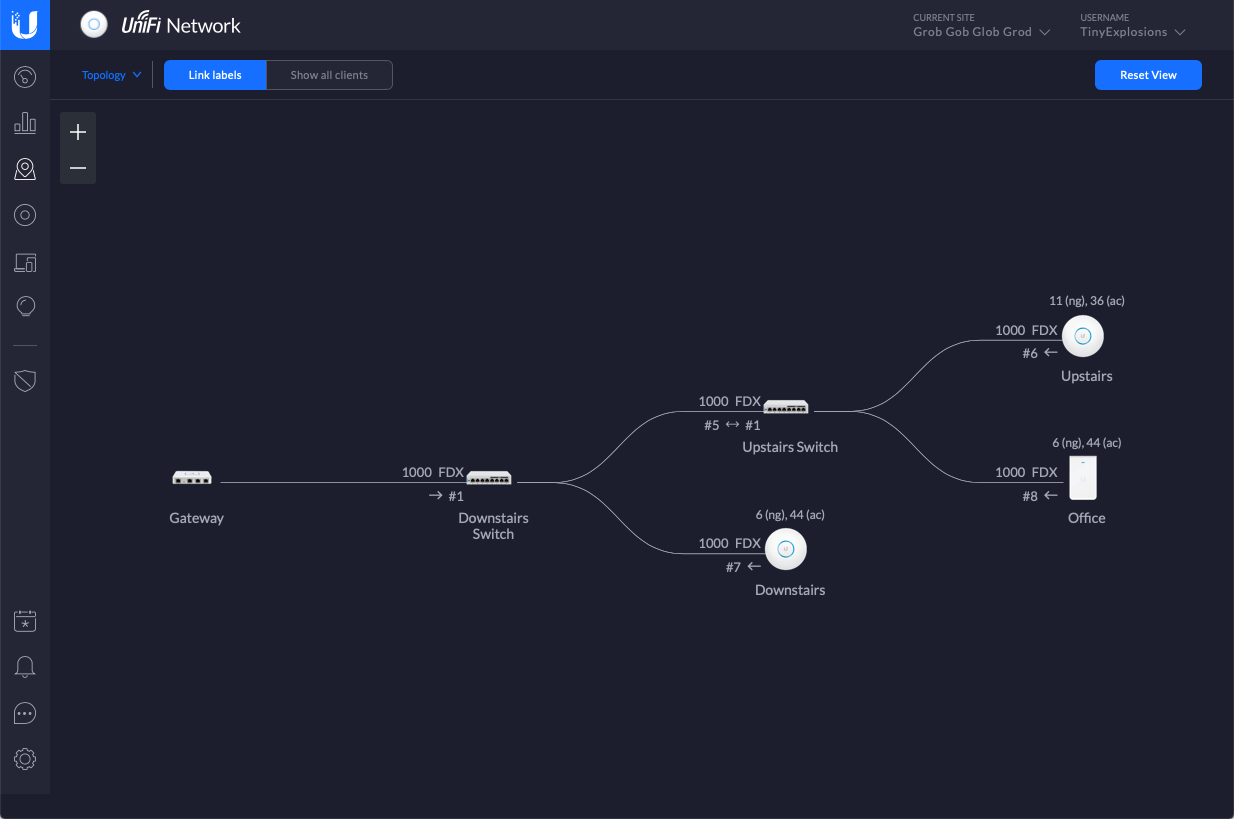
<p><a href="/images/network-device-setup.png"><img src="/images/network-device-setup.png" alt="Screenshot showing the network devices connected together." title="The physical layout of my network devices"></a></p>
<p>Once everything arrived, was plugged in, and recognised by the Controller software (which took longer than it should have due to some dodgy RJ45 sockets and my less than stellar crimping skills), it was time to sort out some networks. Eventually I settled on three:</p>
<ul>
<li><code>Computers n Shit</code> -this is the 'main' computers in the house - our laptops, phones, the Nas, the Raspbrry Pi etc (192.168.0.0/24)</li>
<li><code>Dangerous home assistant yokes</code> -all the IoT devices we have, as well as game consoles, TV, DVR, etc (192.168.42.0/24)</li>
<li><code>Homelab</code> -the homelab -currently just BugCity (178.0.0.0/24)</li>
</ul>
<p>The way Unifi works is that all of these networks have a gateway IP of the *.1 of their subnet (192.168.0.1, 192.168.42.1, 178.0.0.1), but this isn't an actual device, it's all internal. There is also a WAN network defined, that has the PPPoE connection to my ISP, and <em>this</em> is where I define the Raspberry Pi (on 192.168.0.210) as the DNS server for everything that connects to any of the networks.</p>
<p>There are also suitable firewall rules in place so that <code>Computers n Shit</code> can talk to anywhere, <code>Dangerous home assistant yokes</code> is isolated on its own, with a couple of devices specified by MAC address as being able to connect to the NAS, and <code>Homelab</code> is totally on its own.</p>
<p>Finally, I have 2 wireless networks defined, <code>HTTP418</code> (for the Coffee Pot Control Protocol fans) which is part of <code>Computers n Shit</code>, and <code>dodgy-bois</code> which is for <code>Dangerous home assistant yokes</code>. Unifi also lets me choose networks for specific ports on the switches, so that is also used to specify the <code>Homelab</code> and some <code>Dangerous home assistant yokes</code> clients.</p>
<p>So far, so (fairly) straightforward (or maybe a little overkill). It's in the Raspberry Pi though, where things get interesting.</p>
<h3>Pi Hole</h3>
<p>Pi Hole is <a href="https://pi-hole.net/">a black hole for Internet avertisements</a> - basically, it blocks known advert urls at a DNS level. This gives one ad blocking before it even hits your network, saving you bandwidth, and annoying spouses, as they just <em>love</em> clicking on the first result in google for any search, which is always an ad.</p>
<p>The install and basic setup is pretty well covered in the documentation, and I was soon up and running, but it was then I started to want to get a little... esoteric. I'd read a couple of articles on DNS-over-HTTPS, and it seemed like a good idea to me - a fun way to stop any ISP shenanigans, and heck if <a href="https://www.theregister.co.uk/2019/09/24/mozilla_backtracks_doh_for_uk_users/">the UK Government was against it being turned on by default in Firefox</a>, it <em>must</em> be a good idea! Once again, <a href="https://docs.pi-hole.net/guides/dns-over-https/">the documentation</a> was spot on, and soon I was up and running and ready to go. Or was I?</p>
<h3>Internal Resolution</h3>
<p>Once I had the basic setup working, it was time to take it one step further. I have a domain (lets call it <code>foo.com</code>) that points to my static IP, and is port forwarded to my NAS. This is massively convienient, and allows me to stream content when I'm away for work etc, and not have to remember an IP address. However, if I was inside the house, I'd prefer <code>foo.com</code> to resolve to the local address, to avoid a hop outside of my network. Also, it would be really handy to have all my lab DNS handled by IdM. I am using it for LDAP on the lab, and it makes sense to use it as a DNS resolver too. Keep everything in one place and all that.</p>
<p>Thankfully, Pi Hole ships a variant of <code>dnsmasq</code> called FTLDNS. This allows me to use standard <code>dnsmasq</code> declarations. I created a file, <code>/etc/dnsmasq.d/bugcity.conf</code> and entered some config, as follows:</p>
<pre class="language-bash"><code class="language-bash"><span class="highlight-line">localise-queries</span><br><span class="highlight-line"></span><br><span class="highlight-line">no-resolv</span><br><span class="highlight-line"></span><br><span class="highlight-line">domain-needed</span><br><span class="highlight-line">bogus-priv</span><br><span class="highlight-line"></span><br><span class="highlight-line">expand-hosts</span><br><span class="highlight-line"><span class="token assign-left variable">domain</span><span class="token operator">=</span>foo.com</span><br><span class="highlight-line"><span class="token assign-left variable">local</span><span class="token operator">=</span>/foo.com/</span><br><span class="highlight-line"><span class="token assign-left variable">server</span><span class="token operator">=</span>/0.0.178.in-addr.arpa/178.0.0.17</span><br><span class="highlight-line"><span class="token assign-left variable">server</span><span class="token operator">=</span>/bugcity.tech/178.0.0.17</span></code></pre>
<ul>
<li><code>localise-queries</code> means that it will look in <code>/etc/hosts</code> for entries</li>
<li><code>no-resolv</code> means that it will ignore <code>/etc/resolv.conf</code></li>
<li><code>domain-needed</code> means it won't forward A or AAAA queries for plain names, without dots or domain parts. If the name is not known from <code>/etc/hosts</code> or DHCP then a &quot;not found&quot; answer is returned</li>
<li><code>bogus-priv</code> means that all reverse lookups for private IP ranges (ie 192.168.x.x, etc) which are not found in <code>/etc/hosts</code> or the DHCP leases file are answered with &quot;no such domain&quot;</li>
<li><code>expand-hosts</code> means that the domain will be added to simple names (without a period) in <code>/etc/hosts</code> in the same way as for DHCP-derived names.</li>
<li><code>domain</code> and <code>local</code> let me expand simple names and add <code>foo.com</code>, and tells FTL that it's locally resolved, so never go out to DNS for any <code>foo.com</code> addresses (the NAS address is specified in <code>/etc/hosts</code>)</li>
<li><code>server</code> these entries perform forward and reverse lookup from this device to the IDM install that has the IP 178.0.0.17. Basically, this means that any requests for a <code>bugcity.tech</code> address will be kicked to my IdM install, and handled there.</li>
</ul>
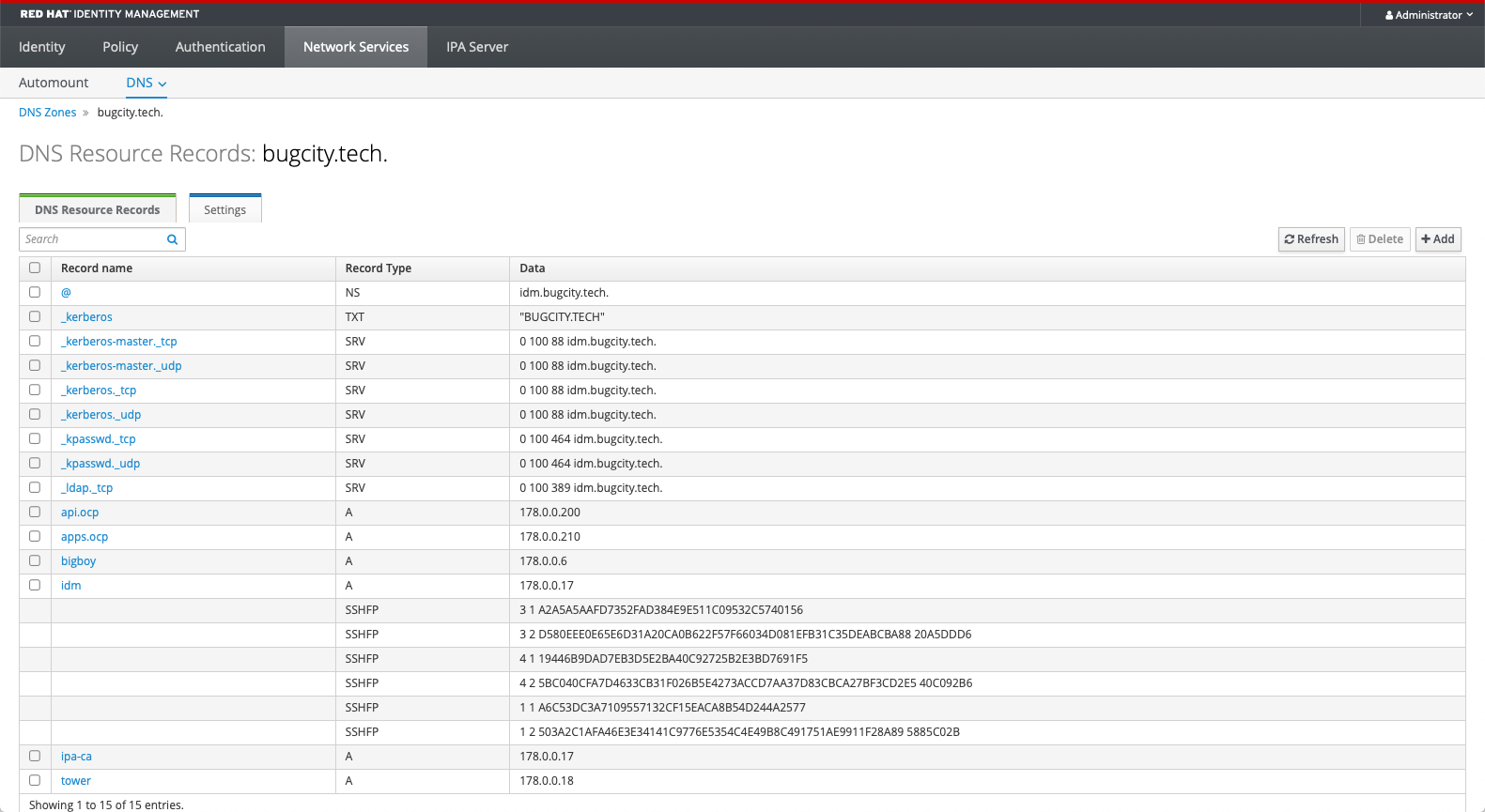
<p>In IdM, I have a few things configured as pictured. Some come automatically when a machine is enrolled with IdM, <code>api.ocp</code> and <code>apps.ocp</code> are the IPs of my OpenShift cluster.</p>
<p><a href="/images/Idm-DNS.png"><img src="/images/Idm-DNS.png" alt="Red Hat Identity Manager DNS page" title="IdM DNS Zone for bugcity.tech."></a></p>
<p>So, there we have it. Some decent routing for requests so that the things I want to keep internal stay internal, and anything that needs to go outside the network are using https, so no snooping by Vodafone :)</p>

    ]]></content>
  </entry>
	
  
  <entry>
    <title>Cron Jobs in OpenShift</title>
    <link href="https://tinyexplosions.com/posts/cron-jobs-in-openshift/"/>
    <updated>2020-05-22T00:00:00-00:00</updated>
    <id>https://tinyexplosions.com/posts/cron-jobs-in-openshift/</id>
    <content type="html"><![CDATA[
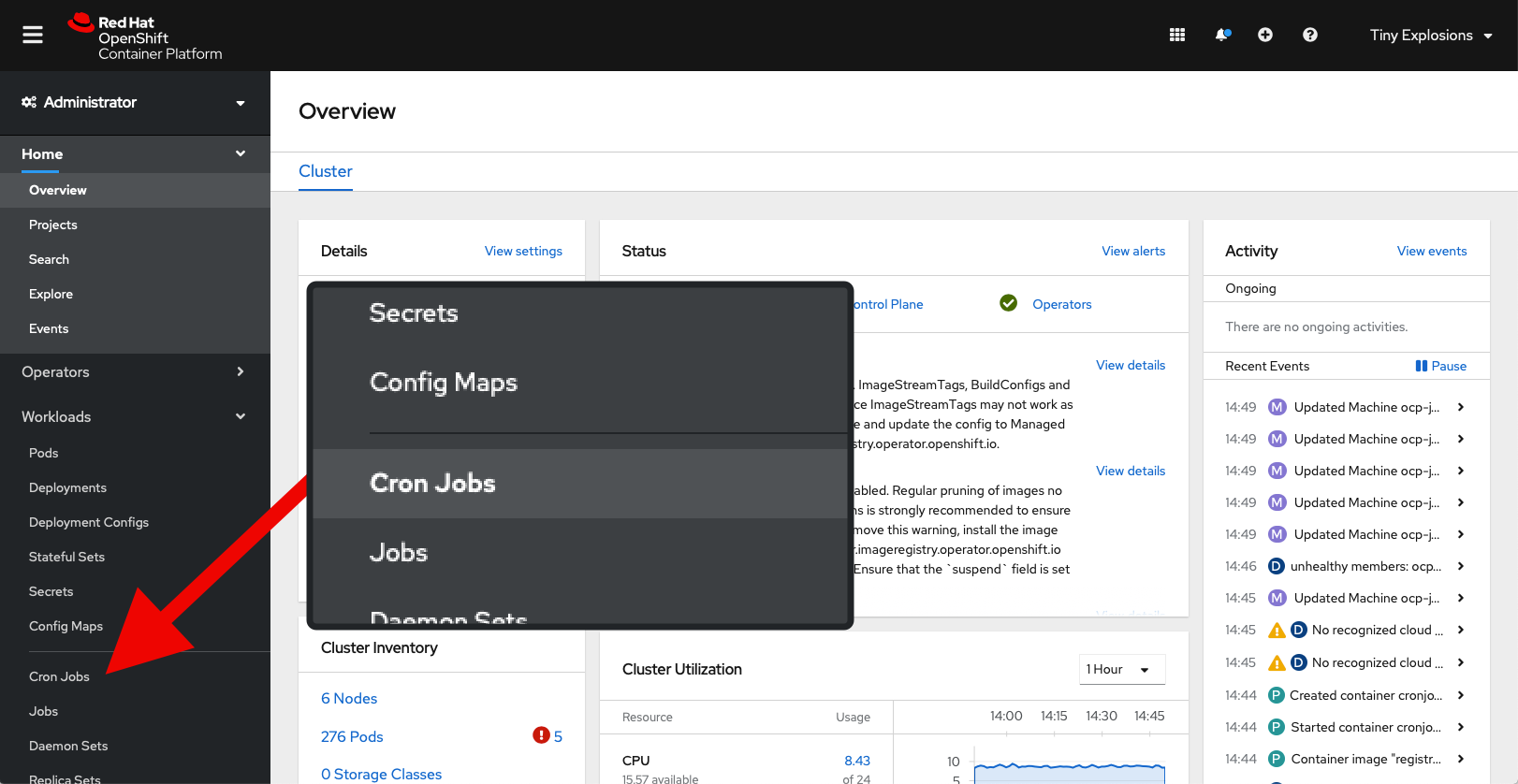
      <p>Yesterday <a href="/posts/ldap-on-openshift">was a successful day</a>, and on the face of it - today should have been child's play. After all, I have created a sync job for OpenShift, I can run it just fine from the command line, all that needs to be done is run it every x mins/hours/days whatever. Heck, there's even a section in the OpenShift Console that's labelled 'Cron Jobs' - I'll be done in minutes.</p>
<p><a href="/images/CRON-JOBS.png"><img src="/images/CRON-JOBS.png" alt="OpenShift Console with 'Cron Jobs' highlighted" title="Look, it's a section labelled 'Cron Jobs' - this is going to be a piece of cake..."></a></p>
<p>It was then that my naivety with the workings of OpenShift came to the fore, leading to a bit more work and googling that I'd expected, but I guess that's why I'm here - to go through the hassle so you don't have to. Or future me doesn't have too when I want to add another cron job in a few months.</p>
<p>Immediately, it was not apparant how to add a new cron job, given that I already had a working yaml file - so it was off to google, and <a href="https://github.com/redhat-cop/openshift-management/blob/master/jobs/cronjob-ldap-group-sync.yml">this template</a> popped up as a likely candidate. Scanning through it, the actual job looked pretty similar to mine, so this was going to be the path to success. Template downloaded, it was a matter of running</p>
<pre class="language-bash"><code class="language-bash"><span class="highlight-line">oc create -f ./cronjob-ldap-group-sync.yml -n openshift-config</span></code></pre>
<p>to get it into OpenShift, in the <code>openshift-config</code> project. Why that one? Mostly because that was where all the LDAP config for authentication went. I'd probably suggest creating a new project for this, but live your own life!</p>
<p>This now had the template added to OpenShift. Now it was time to create something with it.</p>
<p>For this it was into the 'Developer' menu, then selected project <code>openshift-config</code> from the dropdown at the top of the page, then clicked the 'From Catalog' box (after pausing a moment to lament the lack of internationalisation for OpenShift. I want my catalogue damnit). Sticking <code>cronjob-ldap-group-sync</code> in the search box brought up my template, and 'Instantiate Template' got me filling in some variables.</p>
<p>One of the first things I noticed was a variable named 'Service Account' - oops, guess I'd better create one of those - quick jump over to the Users area in another browser, and soon <code>ldap-group-syncer</code> was born, and given appropriate permissions on the account.</p>
<p>Most of the other variable were straightforward, as I was copying values from my own earlier work, but there were a couple that gave me some pause. The default value for 'Group Filter' (<code>(&amp;(objectclass=ipausergroup)(memberOf=cn=openshift-users,cn=groups,cn=accounts,dc=myorg,dc=example,dc=com))</code>) is a lot more restrictive, and therefore better than mine, and so I might investigate something similar later, but for now I stuck with the tried and tested <code>(objectClass=groupOfNames)</code>. I also left 'Image' untouched at <code>registry.access.redhat.com/openshift3/ose-cli</code> even though there's probably an OpenShift4 version, but if it works it works.</p>
<p>Finally, there was the manner of the <code>LDAP sync whitelist</code> input field. Yup, not a text area, an input field. Clearly I had two lines to add (as mentioned in previous post), but how can I add a line break in an input field? The answer is that you try a bit, then stick a space in, click 'Create' and pretend that it's all grand. Back away slowly from the keyboard and have a snack...</p>
<p>Time passed, video calls were had, and then I flipped back over to the OpenShift console, to see a few red &quot;!&quot; - that's not good, lets see what's going on. As I kinda suspected, my whitelist was causing problems. I needed to get the dn's for the whitelist groups on to separate lines. To do this, I went to 'Config Maps' in the sidebar, ensured the correct project (<code>openshift-config</code>) was selected, and selected <code>ldap-config</code>. Into the YAML, and changed whitelist to</p>
<pre class="language-yaml"><code class="language-yaml"><span class="highlight-line"><span class="token key atrule">whitelist.txt</span><span class="token punctuation">:</span> <span class="token punctuation">|</span><span class="token punctuation">-</span></span><br><span class="highlight-line">    cn=superusers<span class="token punctuation">,</span>cn=groups<span class="token punctuation">,</span>cn=accounts<span class="token punctuation">,</span>dc=bugcity<span class="token punctuation">,</span>dc=tech</span><br><span class="highlight-line">    cn=ocpusers<span class="token punctuation">,</span>cn=groups<span class="token punctuation">,</span>cn=accounts<span class="token punctuation">,</span>dc=bugcity<span class="token punctuation">,</span>dc=tech</span></code></pre>
<p>click on save, and in theory I was done. But would have to wait an hour for the job to be run again. I can't have that, so over to the aforementioned, but heretofore unclicked 'Cron Jobs' item, selected my job, and jumped into the YAML to set schedule to <code>*/1 * * * *</code> (that's 'every minute' for those that, like me, don't read cron), and within 60 seconds, my job was running again, and this time - success!</p>
<p><a href="/images/complete.png"><img src="/images/complete.png" alt="Successful run of my cron job" title="Job's a good 'un"></a></p>
<p>So, there we have it. OpenShift is talking to LDAP on IdM to perform Authentication, and every hour will sync LDAP groups with OpenShift, so we have RBAC in place. At some point, it'll be good to add a 'prune' job to run as well, but given that it's only me around, and I'm not going to be adding many users, it's at a lower priority.</p>
<p>What's the next step you ask (quietly)? Well, either some Ansible based Tower fun, or some Service Mesh shenanigans - you'll have to check back to find out.</p>

    ]]></content>
  </entry>
	
  
  <entry>
    <title>OpenShift and LDAP</title>
    <link href="https://tinyexplosions.com/posts/ldap-on-openshift/"/>
    <updated>2020-05-21T00:00:00-00:00</updated>
    <id>https://tinyexplosions.com/posts/ldap-on-openshift/</id>
    <content type="html"><![CDATA[
      <p>Now that I <em>think</em> I have <a href="/posts/it-wasnt-dns">the main woes of my OpenShift cluster</a> sorted, it's time to turn my attention to some other things, and the first one to investigate is configuring the cluster to use my IdM setup to provide LDAP authentication.</p>
<p>Configuration comes in two parts - Authentication, and Authorisation/Role Based Access Control (RBAC). The first is the most basic connection, have you supplied the correct credentials, does the user belong in a specific group, or set of groups, that sort of thing. RBAC is more involved, and creates a periodic job that syncronises groups and pulls them into OpenShift, so you can apply specific Roles and Policies to them. This is the part were you could define that group <code>foo</code> in LDAP has the role <code>cluster-admin</code> etc etc. I leaned heavily <a href="http://v1.uncontained.io/playbooks/installation/ldap_integration.html">on this article</a> for most of what went on below, so it's worth having a scan over first.</p>
<h3>LDAP Configuration</h3>
<p>To begin, it was into IdM to get that side of things squared away. I created a group, <code>ocpusers</code>, and already have a <code>superusers</code> group that I am using as a 'catch all' one to give admin or whatver the highest power privileges are on any connected system, so this should be a good baseline - membership of either group will allow one to log into the cluster, and someone in the <code>superusers</code> group will be a cluser administrator. More complex setups can be considered and added later, but this is a good baseline from which to start. I also have two users to test with, <code>tinyexplosions</code> who is in both the <code>ocpusers</code> and <code>superusers</code> groups (among others), and <code>ocp_user</code> who is only in the <code>ocpusers</code> group.</p>
<p>It was then time to fire up <code>ldapsearch</code> to check out how my particular configuration reports things. Lets get the user <code>tinyexplosions</code>. This will give us the dn's of the various items we will want to query down the road.</p>
<pre class="language-bash"><code class="language-bash"><span class="highlight-line">ldapsearch -x  -LLL -H ldap://idm.bugcity.tech:389 <span class="token punctuation">\</span></span><br><span class="highlight-line">-D <span class="token string">"uid=admin,cn=users,cn=compat,dc=bugcity,dc=tech"</span> <span class="token punctuation">\</span></span><br><span class="highlight-line">-w <span class="token operator">&lt;</span>password<span class="token operator">></span> -b <span class="token string">"cn=users,cn=accounts,dc=bugcity,dc=tech"</span> <span class="token punctuation">\</span></span><br><span class="highlight-line">-s sub <span class="token string">"uid=tinyexplosions"</span></span><br><span class="highlight-line"></span><br><span class="highlight-line">dn: <span class="token assign-left variable">uid</span><span class="token operator">=</span>tinyexplosions,cn<span class="token operator">=</span>users,cn<span class="token operator">=</span>accounts,dc<span class="token operator">=</span>bugcity,dc<span class="token operator">=</span>tech</span><br><span class="highlight-line">givenName: Tiny</span><br><span class="highlight-line">sn: Explosions</span><br><span class="highlight-line">uid: tinyexplosions</span><br><span class="highlight-line">cn: Tiny Explosions</span><br><span class="highlight-line">displayName: Tiny Explosions</span><br><span class="highlight-line">initials: TE</span><br><span class="highlight-line">gecos: Tiny Explosions</span><br><span class="highlight-line">krbPrincipalName: tinyexplosions@BUGCITY.TECH</span><br><span class="highlight-line"><span class="token operator">&lt;</span>snip<span class="token punctuation">..</span>. /<span class="token operator">></span></span><br><span class="highlight-line">mail: tinyexplosions@bugcity.tech</span><br><span class="highlight-line">memberOf: <span class="token assign-left variable">cn</span><span class="token operator">=</span>superusers,cn<span class="token operator">=</span>groups,cn<span class="token operator">=</span>accounts,dc<span class="token operator">=</span>bugcity,dc<span class="token operator">=</span>tech</span><br><span class="highlight-line">memberOf: <span class="token assign-left variable">cn</span><span class="token operator">=</span>ocpusers,cn<span class="token operator">=</span>groups,cn<span class="token operator">=</span>accounts,dc<span class="token operator">=</span>bugcity,dc<span class="token operator">=</span>tech</span><br><span class="highlight-line"></span></code></pre>
<h3>OCP Configuration</h3>
<p>Then, it was into OpenShift, to the cluster OAuth configurater <code>/k8s/cluster/config.openshift.io~v1~OAuth/cluster</code>, and then I used the UI to add an LDAP Identity provider. Based on the info gleaned from above, filled in the fields as follows:</p>
<ul>
<li>Name: ldap</li>
<li>URL: ldap://idm.bugcity.tech:389?uid</li>
<li>BindDN: uid=admin,cn=users,cn=compat,dc=bugcity,dc=tech</li>
<li>Bind Password: &lt;pw&gt;</li>
<li>ID: dn</li>
<li>Preferred Username: uid</li>
<li>Name: cn</li>
<li>Email: mail</li>
<li>CA File: &lt;upload ca taken from IdM&gt;</li>
</ul>
<p>Once that was filled in, I waited a couple of minutes for it to apply, then logged out of the cluster, and was greeted with a new login screen, which was promising</p>
<p><a href="/images/ocp-login.png"><img src="/images/ocp-login.png" alt="OpenShift login screen showing kube:admin and ldap options" title="OpenShift login screen, with a new, shiny 'ldap' button!"></a></p>
<p>Using the new ldap functionality, I input the details for the user <code>tinyexplosions</code>, and it logged me in! Logging out, and retrying authentication with the <code>ocp_user</code> user also allowed me to log in, which was expected, but not desired. From this point it was time to dig into the yaml, and make some changes in order to restrict auth by group.</p>
<h3>Group Restrictions</h3>
<p>The trick to narrow down the authentication to specific groups is to get the ldap url correct. If we look at the existing url, <code>ldap://idm.bugcity.tech:389?uid</code>. we can see that we're looking for a valid <code>uid</code> to be returned. We also want to see if a user is in a specific group. This is done by appending <code>(memberOf=&lt;group&gt;)</code> declarations to the url, so in our case we want to check for <code>ocpusers</code> group, so we can append <code>(memberOf=cn=ocpusers,cn=groups,cn=accounts,dc=bugcity,dc=tech)</code>. The LDAP standard also allows for the differing operators to be added to join or exclude multiple entries, for example <code>(&amp;(memberOf=x)(memberOf=x))</code> would check that a user is a member of both <code>x</code> and <code>y</code> groups.</p>
<p>For our simple example, membership of either pertinent group is just fine, so we want to add <code>(|(memberOf=cn=ocpusers,cn=groups,cn=accounts,dc=bugcity,dc=tech)(memberOf=cn=superusers,cn=groups,cn=accounts,dc=bugcity,dc=tech))</code> to the url. It is appended to our url, with <code>??</code> coming before it, and so the final yaml for my solution looks like below:</p>
<pre class="language-yaml"><code class="language-yaml"><span class="highlight-line"><span class="token key atrule">apiVersion</span><span class="token punctuation">:</span> config.openshift.io/v1</span><br><span class="highlight-line"><span class="token key atrule">kind</span><span class="token punctuation">:</span> OAuth</span><br><span class="highlight-line"><span class="token key atrule">metadata</span><span class="token punctuation">:</span></span><br><span class="highlight-line">  <span class="token key atrule">annotations</span><span class="token punctuation">:</span></span><br><span class="highlight-line">    <span class="token key atrule">release.openshift.io/create-only</span><span class="token punctuation">:</span> <span class="token string">'true'</span></span><br><span class="highlight-line">  <span class="token key atrule">creationTimestamp</span><span class="token punctuation">:</span> <span class="token string">'2020-05-18T21:41:18Z'</span></span><br><span class="highlight-line">  <span class="token key atrule">generation</span><span class="token punctuation">:</span> <span class="token number">14</span></span><br><span class="highlight-line">  <span class="token key atrule">name</span><span class="token punctuation">:</span> cluster</span><br><span class="highlight-line">  <span class="token key atrule">resourceVersion</span><span class="token punctuation">:</span> <span class="token string">'2428122'</span></span><br><span class="highlight-line">  <span class="token key atrule">selfLink</span><span class="token punctuation">:</span> /apis/config.openshift.io/v1/oauths/cluster</span><br><span class="highlight-line">  <span class="token key atrule">uid</span><span class="token punctuation">:</span> 91f17651<span class="token punctuation">-</span>559f<span class="token punctuation">-</span>4f9b<span class="token punctuation">-</span>b5fe<span class="token punctuation">-</span>300f64e3e48a</span><br><span class="highlight-line"><span class="token key atrule">spec</span><span class="token punctuation">:</span></span><br><span class="highlight-line">  <span class="token key atrule">identityProviders</span><span class="token punctuation">:</span></span><br><span class="highlight-line">    <span class="token punctuation">-</span> <span class="token key atrule">ldap</span><span class="token punctuation">:</span></span><br><span class="highlight-line">        <span class="token key atrule">attributes</span><span class="token punctuation">:</span></span><br><span class="highlight-line">          <span class="token key atrule">email</span><span class="token punctuation">:</span></span><br><span class="highlight-line">            <span class="token punctuation">-</span> mail</span><br><span class="highlight-line">          <span class="token key atrule">id</span><span class="token punctuation">:</span></span><br><span class="highlight-line">            <span class="token punctuation">-</span> dn</span><br><span class="highlight-line">          <span class="token key atrule">name</span><span class="token punctuation">:</span></span><br><span class="highlight-line">            <span class="token punctuation">-</span> cn</span><br><span class="highlight-line">          <span class="token key atrule">preferredUsername</span><span class="token punctuation">:</span></span><br><span class="highlight-line">            <span class="token punctuation">-</span> uid</span><br><span class="highlight-line">        <span class="token key atrule">bindDN</span><span class="token punctuation">:</span> <span class="token string">'uid=admin,cn=users,cn=compat,dc=bugcity,dc=tech'</span></span><br><span class="highlight-line">        <span class="token key atrule">bindPassword</span><span class="token punctuation">:</span></span><br><span class="highlight-line">          <span class="token key atrule">name</span><span class="token punctuation">:</span> ldap<span class="token punctuation">-</span>bind<span class="token punctuation">-</span>password<span class="token punctuation">-</span>n8t8w</span><br><span class="highlight-line">        <span class="token key atrule">ca</span><span class="token punctuation">:</span></span><br><span class="highlight-line">          <span class="token key atrule">name</span><span class="token punctuation">:</span> ldap<span class="token punctuation">-</span>ca<span class="token punctuation">-</span>6mqjz</span><br><span class="highlight-line">        <span class="token key atrule">insecure</span><span class="token punctuation">:</span> <span class="token boolean important">false</span></span><br><span class="highlight-line">        <span class="token key atrule">url</span><span class="token punctuation">:</span> <span class="token punctuation">></span><span class="token punctuation">-</span></span><br><span class="highlight-line">          ldap<span class="token punctuation">:</span>//idm.bugcity.tech<span class="token punctuation">:</span>389/cn=users<span class="token punctuation">,</span>cn=accounts<span class="token punctuation">,</span>dc=bugcity<span class="token punctuation">,</span>dc=tech<span class="token punctuation">?</span>uid<span class="token punctuation">?</span><span class="token punctuation">?</span></span><br><span class="highlight-line">          (<span class="token punctuation">|</span>(memberOf=cn=ocpusers<span class="token punctuation">,</span>cn=groups<span class="token punctuation">,</span>cn=accounts<span class="token punctuation">,</span>dc=bugcity<span class="token punctuation">,</span>dc=tech)</span><br><span class="highlight-line">          (memberOf=cn=superusers<span class="token punctuation">,</span>cn=groups<span class="token punctuation">,</span>cn=accounts<span class="token punctuation">,</span>dc=bugcity<span class="token punctuation">,</span>dc=tech))</span><br><span class="highlight-line">      <span class="token key atrule">mappingMethod</span><span class="token punctuation">:</span> claim</span><br><span class="highlight-line">      <span class="token key atrule">name</span><span class="token punctuation">:</span> ldap</span><br><span class="highlight-line">      <span class="token key atrule">type</span><span class="token punctuation">:</span> LDAP</span></code></pre>
<p>Applying the above, and waiting the appropriate time for it to apply, and it was back to the login screen to test. First up I was able to successfully log in with both accounts. From there, it was back to IdM, and I removed user <code>ocp_user</code> from the <code>ocpusers</code> group, and was then unable to log into OpenShift with them. The user <code>tinyexplosions</code> continued to work, and remained able to log in with membership of <em>either</em> <code>superusers</code> or <code>ocpusers</code> enabled, or with membership of both groups enabled, which is what I wanted.</p>
<h3>Syncing Groups</h3>
<p>This is where things get a little trickier. <a href="https://docs.openshift.com/container-platform/4.4/authentication/ldap-syncing.html">The official documents</a> are pretty good, so I sugegst reading through them first. Then fire up a text editor and write some more YAML (christ, does OpenShift love a bit of YAML). Nothing too fancy here though:</p>
<pre class="language-yaml"><code class="language-yaml"><span class="highlight-line"><span class="token key atrule">kind</span><span class="token punctuation">:</span> LDAPSyncConfig</span><br><span class="highlight-line"><span class="token key atrule">apiVersion</span><span class="token punctuation">:</span> v1</span><br><span class="highlight-line"><span class="token key atrule">url</span><span class="token punctuation">:</span> ldap<span class="token punctuation">:</span>//idm.bugcity.tech<span class="token punctuation">:</span><span class="token number">389</span></span><br><span class="highlight-line"><span class="token key atrule">insecure</span><span class="token punctuation">:</span> <span class="token boolean important">false</span></span><br><span class="highlight-line"><span class="token key atrule">ca</span><span class="token punctuation">:</span> <span class="token string">"&lt;relative/link/to/cert.pem>"</span></span><br><span class="highlight-line"><span class="token key atrule">bindDN</span><span class="token punctuation">:</span> <span class="token string">"uid=admin,cn=users,cn=compat,dc=bugcity,dc=tech"</span></span><br><span class="highlight-line"><span class="token key atrule">bindPassword</span><span class="token punctuation">:</span> <span class="token string">"&lt;password>"</span></span><br><span class="highlight-line"><span class="token key atrule">groupUIDNameMapping</span><span class="token punctuation">:</span></span><br><span class="highlight-line">    "cn=superusers<span class="token punctuation">,</span>cn=groups<span class="token punctuation">,</span>cn=accounts<span class="token punctuation">,</span>dc=bugcity<span class="token punctuation">,</span><span class="token key atrule">dc=tech"</span><span class="token punctuation">:</span> openshift_admins</span><br><span class="highlight-line"><span class="token key atrule">rfc2307</span><span class="token punctuation">:</span></span><br><span class="highlight-line">    <span class="token key atrule">groupsQuery</span><span class="token punctuation">:</span></span><br><span class="highlight-line">        <span class="token key atrule">baseDN</span><span class="token punctuation">:</span> <span class="token string">"cn=accounts,dc=bugcity,dc=tech"</span></span><br><span class="highlight-line">        <span class="token key atrule">scope</span><span class="token punctuation">:</span> sub</span><br><span class="highlight-line">        <span class="token key atrule">derefAliases</span><span class="token punctuation">:</span> never</span><br><span class="highlight-line">        <span class="token key atrule">filter</span><span class="token punctuation">:</span> (objectClass=groupOfNames)</span><br><span class="highlight-line">        <span class="token key atrule">pageSize</span><span class="token punctuation">:</span> <span class="token number">0</span></span><br><span class="highlight-line">    <span class="token key atrule">groupUIDAttribute</span><span class="token punctuation">:</span> dn</span><br><span class="highlight-line">    <span class="token key atrule">groupNameAttributes</span><span class="token punctuation">:</span> <span class="token punctuation">[</span> cn <span class="token punctuation">]</span></span><br><span class="highlight-line">    <span class="token key atrule">groupMembershipAttributes</span><span class="token punctuation">:</span> <span class="token punctuation">[</span> member <span class="token punctuation">]</span></span><br><span class="highlight-line">    <span class="token key atrule">usersQuery</span><span class="token punctuation">:</span></span><br><span class="highlight-line">        <span class="token key atrule">baseDN</span><span class="token punctuation">:</span> <span class="token string">"cn=users,cn=accounts,dc=bugcity,dc=tech"</span></span><br><span class="highlight-line">        <span class="token key atrule">scope</span><span class="token punctuation">:</span> sub</span><br><span class="highlight-line">        <span class="token key atrule">derefAliases</span><span class="token punctuation">:</span> never</span><br><span class="highlight-line">        <span class="token key atrule">pageSize</span><span class="token punctuation">:</span> <span class="token number">0</span></span><br><span class="highlight-line">    <span class="token key atrule">userUIDAttribute</span><span class="token punctuation">:</span> dn</span><br><span class="highlight-line">    <span class="token key atrule">userNameAttributes</span><span class="token punctuation">:</span> <span class="token punctuation">[</span> uid <span class="token punctuation">]</span></span></code></pre>
<p>Of interest are the <code>baseDn</code>, <code>filter</code> and attribute fields. All of these should be familiar though. The <code>baseDn</code> is the one secified in the Tower integration, so you can copy those from the LDAP User Search and LDAP Group Search fields we added <a href="/posts/tower-ldap-integration">in our configuration</a> last week. Also, the <code>filter</code> attribute is taken from the Tower config too - it's the LDAP Group Search filter, so can be added here too. The various attribute fields are to get the full dn of users, and the attribute we want to appear as a username in OpenShift. Finally, we have <code>groupUIDNameMapping</code>. This allows us to have a group with one name in LDAP, and another in OpenShift. In this case, we take our <code>superusers</code> group in LDAP, and call it <code>openshift_admins</code> in OCP.</p>
<p>As is stands, running this will take every group LDAP sees and add them as groups in OpenShift. Clearly this isn't desirable, and so that is where whitelists and blacklists come in. They are files that you can use to explicitly include or exclude groups from the sync. In our example, we only want the <code>superusers</code> and <code>ocpusers</code> groups to sync their info, so we add their dn's to a whitelist file</p>
<pre class="language-text"><code class="language-text"><span class="highlight-line">cn=superusers,cn=groups,cn=accounts,dc=bugcity,dc=tech</span><br><span class="highlight-line">cn=ocpusers,cn=groups,cn=accounts,dc=bugcity,dc=tech</span></code></pre>
<p>Once these resources are in place, you can run it against OpenShift (leave out the <code>--confirm</code> if you just want to test the output.</p>
<pre><code> oc adm groups sync --sync-config=./usersync.yaml --whitelist=./whitelist.txt --confirm
</code></pre>
<p>During some of my runs, I saw the following error, all it meant was the group <code>openshift_admins</code> already existed (and wasn't created by an earlier sync), and so I deleted the group and ran it again.</p>
<pre class="language-bash"><code class="language-bash"><span class="highlight-line">group <span class="token string">"openshift_admins"</span><span class="token builtin class-name">:</span> openshift.io/ldap.host label did not match <span class="token function">sync</span> host: wanted idm.bugcity.tech, got</span></code></pre>
<p>After a successful run, I could see my users and groups in OpenShift, and the only thing left to do was make the <code>openshift_admins</code> group cluster adminsitrators, meaning <code>tinyexplosions</code> can mess up anything they want!</p>
<pre><code>oc adm policy add-cluster-role-to-group cluster-admin openshift_admins
</code></pre>
<p>Repeating the logout/login dance with user <code>tinyexplosions</code> and I was greeted with the Administrator overview, and some lovely errors to look into - but from an auth point of view, it was a rousing success.</p>
<p><a href="/images/ldap-user-admin.png"><img src="/images/ldap-user-admin.png" alt="OpenShift admin dashboard with user TinyExplosions authenticated" title="TinyExplosions logged in as a cluster admin (ignore the errors, that'll get sorted later)"></a></p>
<p>Another useful command to know is <code>oc adm groups prune --sync-config=./usersync.yaml --whitelist=./whitelist --confirm</code> - this will remove users who no longer exist in the groups and keep you in tip top shape.</p>
<p>The only thing left to do now is make all the above a cron job, so that we can periodically sync, but that is for next time.</p>

    ]]></content>
  </entry>
	
  
  <entry>
    <title>It Wan&#39;t DNS?</title>
    <link href="https://tinyexplosions.com/posts/it-wasnt-dns/"/>
    <updated>2020-05-20T00:00:00-00:00</updated>
    <id>https://tinyexplosions.com/posts/it-wasnt-dns/</id>
    <content type="html"><![CDATA[
      <p>It's been a few days now since I took the steps mentioned in <a href="/posts/its-always-dns">my last post</a>, and I cleared everything out and started again. It took a couple of hours, but thanks to it not being the first time, and the notes I'd made on the way, I had the server (now christened <code>bigboy.bugcity.tech</code>) up, with RHEV installed, and my network and disk setup as described in the post.</p>
<p>Then it was time to re-run <code>fio</code>, just to see what difference had been made. First on <code>slow-disks</code> - a RAID-0 pair of 500GB spinners</p>
<pre class="language-bash"><code class="language-bash"><span class="highlight-line">fsync/fdatasync/sync_file_range:</span><br><span class="highlight-line">    <span class="token function">sync</span> <span class="token punctuation">(</span>msec<span class="token punctuation">)</span>: <span class="token assign-left variable">min</span><span class="token operator">=</span><span class="token number">3</span>, <span class="token assign-left variable">max</span><span class="token operator">=</span><span class="token number">359</span>, <span class="token assign-left variable">avg</span><span class="token operator">=</span><span class="token number">27.65</span>, <span class="token assign-left variable">stdev</span><span class="token operator">=</span><span class="token number">15.33</span></span><br><span class="highlight-line">    <span class="token function">sync</span> percentiles <span class="token punctuation">(</span>msec<span class="token punctuation">)</span>:</span><br><span class="highlight-line">     <span class="token operator">|</span>  <span class="token number">1</span>.00th<span class="token operator">=</span><span class="token punctuation">[</span>    <span class="token number">5</span><span class="token punctuation">]</span>,  <span class="token number">5</span>.00th<span class="token operator">=</span><span class="token punctuation">[</span>   <span class="token number">12</span><span class="token punctuation">]</span>, <span class="token number">10</span>.00th<span class="token operator">=</span><span class="token punctuation">[</span>   <span class="token number">18</span><span class="token punctuation">]</span>, <span class="token number">20</span>.00th<span class="token operator">=</span><span class="token punctuation">[</span>   <span class="token number">20</span><span class="token punctuation">]</span>,</span><br><span class="highlight-line">     <span class="token operator">|</span> <span class="token number">30</span>.00th<span class="token operator">=</span><span class="token punctuation">[</span>   <span class="token number">22</span><span class="token punctuation">]</span>, <span class="token number">40</span>.00th<span class="token operator">=</span><span class="token punctuation">[</span>   <span class="token number">24</span><span class="token punctuation">]</span>, <span class="token number">50</span>.00th<span class="token operator">=</span><span class="token punctuation">[</span>   <span class="token number">26</span><span class="token punctuation">]</span>, <span class="token number">60</span>.00th<span class="token operator">=</span><span class="token punctuation">[</span>   <span class="token number">28</span><span class="token punctuation">]</span>,</span><br><span class="highlight-line">     <span class="token operator">|</span> <span class="token number">70</span>.00th<span class="token operator">=</span><span class="token punctuation">[</span>   <span class="token number">30</span><span class="token punctuation">]</span>, <span class="token number">80</span>.00th<span class="token operator">=</span><span class="token punctuation">[</span>   <span class="token number">32</span><span class="token punctuation">]</span>, <span class="token number">90</span>.00th<span class="token operator">=</span><span class="token punctuation">[</span>   <span class="token number">42</span><span class="token punctuation">]</span>, <span class="token number">95</span>.00th<span class="token operator">=</span><span class="token punctuation">[</span>   <span class="token number">42</span><span class="token punctuation">]</span>,</span><br><span class="highlight-line">     <span class="token operator">|</span> <span class="token number">99</span>.00th<span class="token operator">=</span><span class="token punctuation">[</span>  <span class="token number">112</span><span class="token punctuation">]</span>, <span class="token number">99</span>.50th<span class="token operator">=</span><span class="token punctuation">[</span>  <span class="token number">128</span><span class="token punctuation">]</span>, <span class="token number">99</span>.90th<span class="token operator">=</span><span class="token punctuation">[</span>  <span class="token number">157</span><span class="token punctuation">]</span>, <span class="token number">99</span>.95th<span class="token operator">=</span><span class="token punctuation">[</span>  <span class="token number">163</span><span class="token punctuation">]</span>,</span><br><span class="highlight-line">     <span class="token operator">|</span> <span class="token number">99</span>.99th<span class="token operator">=</span><span class="token punctuation">[</span>  <span class="token number">205</span><span class="token punctuation">]</span></span></code></pre>
<p>99th percentile was faster, at 112ms, but still way above the 10ms recommended. Lets look at <code>fast-disk</code>, the SSD</p>
<pre class="language-bash"><code class="language-bash"><span class="highlight-line"> fsync/fdatasync/sync_file_range:</span><br><span class="highlight-line">    <span class="token function">sync</span> <span class="token punctuation">(</span>usec<span class="token punctuation">)</span>: <span class="token assign-left variable">min</span><span class="token operator">=</span><span class="token number">293</span>, <span class="token assign-left variable">max</span><span class="token operator">=</span><span class="token number">31180</span>, <span class="token assign-left variable">avg</span><span class="token operator">=</span><span class="token number">1507.45</span>, <span class="token assign-left variable">stdev</span><span class="token operator">=</span><span class="token number">722.84</span></span><br><span class="highlight-line">    <span class="token function">sync</span> percentiles <span class="token punctuation">(</span>usec<span class="token punctuation">)</span>:</span><br><span class="highlight-line">     <span class="token operator">|</span>  <span class="token number">1</span>.00th<span class="token operator">=</span><span class="token punctuation">[</span>  <span class="token number">318</span><span class="token punctuation">]</span>,  <span class="token number">5</span>.00th<span class="token operator">=</span><span class="token punctuation">[</span>  <span class="token number">334</span><span class="token punctuation">]</span>, <span class="token number">10</span>.00th<span class="token operator">=</span><span class="token punctuation">[</span>  <span class="token number">343</span><span class="token punctuation">]</span>, <span class="token number">20</span>.00th<span class="token operator">=</span><span class="token punctuation">[</span>  <span class="token number">379</span><span class="token punctuation">]</span>,</span><br><span class="highlight-line">     <span class="token operator">|</span> <span class="token number">30</span>.00th<span class="token operator">=</span><span class="token punctuation">[</span> <span class="token number">1401</span><span class="token punctuation">]</span>, <span class="token number">40</span>.00th<span class="token operator">=</span><span class="token punctuation">[</span> <span class="token number">1418</span><span class="token punctuation">]</span>, <span class="token number">50</span>.00th<span class="token operator">=</span><span class="token punctuation">[</span> <span class="token number">1860</span><span class="token punctuation">]</span>, <span class="token number">60</span>.00th<span class="token operator">=</span><span class="token punctuation">[</span> <span class="token number">1876</span><span class="token punctuation">]</span>,</span><br><span class="highlight-line">     <span class="token operator">|</span> <span class="token number">70</span>.00th<span class="token operator">=</span><span class="token punctuation">[</span> <span class="token number">1909</span><span class="token punctuation">]</span>, <span class="token number">80</span>.00th<span class="token operator">=</span><span class="token punctuation">[</span> <span class="token number">1942</span><span class="token punctuation">]</span>, <span class="token number">90</span>.00th<span class="token operator">=</span><span class="token punctuation">[</span> <span class="token number">1991</span><span class="token punctuation">]</span>, <span class="token number">95</span>.00th<span class="token operator">=</span><span class="token punctuation">[</span> <span class="token number">2212</span><span class="token punctuation">]</span>,</span><br><span class="highlight-line">     <span class="token operator">|</span> <span class="token number">99</span>.00th<span class="token operator">=</span><span class="token punctuation">[</span> <span class="token number">2606</span><span class="token punctuation">]</span>, <span class="token number">99</span>.50th<span class="token operator">=</span><span class="token punctuation">[</span> <span class="token number">2671</span><span class="token punctuation">]</span>, <span class="token number">99</span>.90th<span class="token operator">=</span><span class="token punctuation">[</span> <span class="token number">2868</span><span class="token punctuation">]</span>, <span class="token number">99</span>.95th<span class="token operator">=</span><span class="token punctuation">[</span> <span class="token number">2900</span><span class="token punctuation">]</span>,</span><br><span class="highlight-line">     <span class="token operator">|</span> <span class="token number">99</span>.99th<span class="token operator">=</span><span class="token punctuation">[</span> <span class="token number">7439</span><span class="token punctuation">]</span></span></code></pre>
<p>That puts the 99th percentile at 2.6ms, well within what we need. With that, I decided to run the install on the fast drive to see what happened, so did a little bastion dance, some configuration and ran <code>create cluster</code>. 40 minutes or so later....</p>
<p><a href="/images/openshift-dashboard.png"><img src="/images/openshift-dashboard.png" alt="Dashboard of a freshly installed OpenShift Instance" title="Holy good gravy, there's an OpenShift dashboard!"></a></p>
<p>So, that told me a lot - or at least told me that it was either the networking, or the disks that were to blame. While it would be great to just move on and call it done, I can't just do that - I have to know <em>for sure</em>, so it was out with <code>cluster-install destroy cluster</code> and a reconfigure to use the slower disks.</p>
<p>That my friends, led to errors. Lots of timeout-y errors, the sort I have seen a lot in the last few days. This wasa the beginning of a saga that would consume most of the weekend, and lead to some interesting conclusions.</p>
<ul>
<li>I reinstalled everything from scratch, and attempted an install, and it worked.</li>
<li>I deleted, and tried another install on a fast disk, it worked (though didn't finish cleanly, I had to reboot a master).</li>
<li>I deleted, and tried on <code>slow-disks</code> and it failed.</li>
</ul>
<p>So, that was getting somewhere - maybe it <em>is</em> disk speed that is the problem. To dig deeper, I then</p>
<ul>
<li>Deleted, Tried Install again on <code>slow-disks</code> - failure.</li>
<li>Deleted, Tried Install on <code>fast-disk</code> - failure.</li>
</ul>
<p>Damnit, that means I can't rule out disks for sure. It was back to a fresh install of everything, RHEL 7 on the Server, RHEV, set up a clean Bastion VM, and install on <code>fast-disk</code>. Success! Then the thought hit me, in the previous tests, after the sucessful install of OCP, I had spun up an IdM server - could that have been the problem? Only one way to find out...</p>
<ul>
<li>Deleted, Tried Install on <code>fast-disk</code> - failure.</li>
</ul>
<p>Head, meet wall. This made no sense to me. I was spinning up a new VM, installing RHEL on it, and using it as a bastion each time. Deleting VMs on RHV should clear everything out, but I just wasn't seeing that happen. In a bit of desparation, I had one last idea. What if it was Unifi being an asshole with DHCP. I knew things were getting IPs ok, but maybe, just maybe.</p>
<p>Only thing to do was to turn off the server, and change subnet on the network. <code>178.0.0.x</code> became <code>170.0.0.x</code>. Booted up, created a bastion, ran the installer, and.... failure! THat was when I realised I'd changed <em>two</em> things instead of one. I'd also specified a new name for the cluster <code>lab.bugcity.tech</code>, not <code>ocp.bugcity.tech</code> and guess who hadn't updated that in dnsmasq of PiHole ;(</p>
<p>Restarted server, changed subnet, made <em>correct</em> changes in PiHole, and started the install dance again. This time - success!</p>
<p>So there you have it - exactly what the cause is, I don't know, but changing network settings seemed to fix things.</p>
<p>It looks like it was DNS.</p>

    ]]></content>
  </entry>
	
  
  <entry>
    <title>It&#39;s Always DNS</title>
    <link href="https://tinyexplosions.com/posts/its-always-dns/"/>
    <updated>2020-05-16T00:00:00-00:00</updated>
    <id>https://tinyexplosions.com/posts/its-always-dns/</id>
    <content type="html"><![CDATA[
      <p>OpenShift just won’t install. I’m using IPI, which should be the foolproof method. I’m following the instructions -both in a cursory way, and also in a very detailed, read every line kind of way. I’ve kicked off the installer countless times. I’ve stared at <code>INFO Waiting up to 30m0s for the cluster to initialize...</code> for a <em>lot</em> more than 30 mins. I’ve left it overnight to see if it sorts itself. I’ve tried to debug. I’ve used up close to all the goodwill of some of my workmates (who are total champions btw).  Still though, I don’t have an installed cluster.</p>
<p>During one debug session, I was sshing into a node, and tried (and failed) to do it directly via hostname. This led to some interesting experiments</p>
<pre class="language-bash"><code class="language-bash"><span class="highlight-line">$ <span class="token function">ping</span> ocp-nln68-master-1</span><br><span class="highlight-line">PING ocp-nln68-master-1.bugcity.tech.bugcity.tech <span class="token punctuation">(</span><span class="token number">178.0</span>.0.11<span class="token punctuation">)</span>: <span class="token number">56</span> data bytes</span></code></pre>
<p>What was interesting was the <code>.bugcity.tech.bugcity.tech</code>, and the fact that it was resolving to the server <code>178.0.0.11</code>, rather than the expected <code>178.0.0.59</code> This disappeared after a while, but got me digging deeper. Then something struck me. I run a Raspberry Pi with Pi-Hole on it as my network’s DNS (it calls out to cloudflare dns over https), and I use it’s built in fork of dnsmasq to do some local serving of traffic (again, I barely know what any of it does, but it seems to work). Here’s a snippet from <code>/etc/dnsmasq.d/01-pihole.conf</code></p>
<pre class="language-bash"><code class="language-bash"><span class="highlight-line">local-ttl<span class="token operator">=</span><span class="token number">2</span></span><br><span class="highlight-line"><span class="token assign-left variable">local</span><span class="token operator">=</span>/etc/hosts/</span><br><span class="highlight-line">log-async</span><br><span class="highlight-line"><span class="token assign-left variable">address</span><span class="token operator">=</span>/.bugcity.tech/178.0.0.11</span><br><span class="highlight-line"><span class="token assign-left variable">address</span><span class="token operator">=</span>/.ocp.bugcity.tech/178.0.0.200</span><br><span class="highlight-line"><span class="token assign-left variable">address</span><span class="token operator">=</span>/.apps.ocp.bugcity.tech/178.0.0.210</span><br><span class="highlight-line"><span class="token assign-left variable">server</span><span class="token operator">=</span><span class="token number">127.0</span>.0.1<span class="token comment">#5053</span></span><br><span class="highlight-line"><span class="token assign-left variable">server</span><span class="token operator">=</span>::1<span class="token comment">#5053</span></span><br><span class="highlight-line">domain-needed</span><br><span class="highlight-line">bogus-priv</span><br><span class="highlight-line">except-interface<span class="token operator">=</span>nonexisting</span></code></pre>
<p><em>short aside, once I decided to buy a lab, like most good techies, I went out and purchased a domain, <code>bugcity.tech</code> -I would use this a lot...</em></p>
<p>I also created a nice separate network for lab based play, you know, following best practise and separating traffic and all that good stuff (again, I feel I must stress that I don't really understand <em>any</em> of this stuff deeply, so if you're an expert, feel free to roll your eyes). It was configured as below</p>
<p><a href="/images/network-setup.png"><img src="/images/network-setup.png" alt="Screenshot of Unifi Admin console showing the networking setup"></a></p>
<p>Note the domain name I gave the network - <code>bugcity.tech</code>. Then, once I got my hot little fingers on the server, I fired it up (eventually) and stuck, you guessed it! <code>bugcity.tech</code> as its hostname, and therefore the host for RHEV. That’s a lot of work for a single name, and while I don’t have a specific evidence that this is too blame, I am highly suspicious, so things need to change.</p>
<p>Another thing I investigated while all this was going on was disk speed. <a href="https://www.ibm.com/cloud/blog/using-fio-to-tell-whether-your-storage-is-fast-enough-for-etcd">According to this article</a>, I needed check if the 99th percentile of fdatasync durations is less than 10ms. I dutifully ran the wee tool and got, well less than that.</p>
<pre class="language-bash"><code class="language-bash"><span class="highlight-line"><span class="token function">sync</span> <span class="token punctuation">(</span>msec<span class="token punctuation">)</span>: <span class="token assign-left variable">min</span><span class="token operator">=</span><span class="token number">3</span>, <span class="token assign-left variable">max</span><span class="token operator">=</span><span class="token number">478</span>, <span class="token assign-left variable">avg</span><span class="token operator">=</span><span class="token number">20.59</span>, <span class="token assign-left variable">stdev</span><span class="token operator">=</span><span class="token number">36.51</span></span><br><span class="highlight-line">    <span class="token function">sync</span> percentiles <span class="token punctuation">(</span>msec<span class="token punctuation">)</span>:</span><br><span class="highlight-line">     <span class="token operator">|</span>  <span class="token number">1</span>.00th<span class="token operator">=</span><span class="token punctuation">[</span>    <span class="token number">4</span><span class="token punctuation">]</span>,  <span class="token number">5</span>.00th<span class="token operator">=</span><span class="token punctuation">[</span>    <span class="token number">6</span><span class="token punctuation">]</span>, <span class="token number">10</span>.00th<span class="token operator">=</span><span class="token punctuation">[</span>    <span class="token number">6</span><span class="token punctuation">]</span>, <span class="token number">20</span>.00th<span class="token operator">=</span><span class="token punctuation">[</span>    <span class="token number">9</span><span class="token punctuation">]</span>,</span><br><span class="highlight-line">     <span class="token operator">|</span> <span class="token number">30</span>.00th<span class="token operator">=</span><span class="token punctuation">[</span>   <span class="token number">10</span><span class="token punctuation">]</span>, <span class="token number">40</span>.00th<span class="token operator">=</span><span class="token punctuation">[</span>   <span class="token number">12</span><span class="token punctuation">]</span>, <span class="token number">50</span>.00th<span class="token operator">=</span><span class="token punctuation">[</span>   <span class="token number">14</span><span class="token punctuation">]</span>, <span class="token number">60</span>.00th<span class="token operator">=</span><span class="token punctuation">[</span>   <span class="token number">16</span><span class="token punctuation">]</span>,</span><br><span class="highlight-line">     <span class="token operator">|</span> <span class="token number">70</span>.00th<span class="token operator">=</span><span class="token punctuation">[</span>   <span class="token number">17</span><span class="token punctuation">]</span>, <span class="token number">80</span>.00th<span class="token operator">=</span><span class="token punctuation">[</span>   <span class="token number">18</span><span class="token punctuation">]</span>, <span class="token number">90</span>.00th<span class="token operator">=</span><span class="token punctuation">[</span>   <span class="token number">20</span><span class="token punctuation">]</span>, <span class="token number">95</span>.00th<span class="token operator">=</span><span class="token punctuation">[</span>   <span class="token number">84</span><span class="token punctuation">]</span>,</span><br><span class="highlight-line">     <span class="token operator">|</span> <span class="token number">99</span>.00th<span class="token operator">=</span><span class="token punctuation">[</span>  <span class="token number">205</span><span class="token punctuation">]</span>, <span class="token number">99</span>.50th<span class="token operator">=</span><span class="token punctuation">[</span>  <span class="token number">268</span><span class="token punctuation">]</span>, <span class="token number">99</span>.90th<span class="token operator">=</span><span class="token punctuation">[</span>  <span class="token number">351</span><span class="token punctuation">]</span>, <span class="token number">99</span>.95th<span class="token operator">=</span><span class="token punctuation">[</span>  <span class="token number">384</span><span class="token punctuation">]</span>,</span><br><span class="highlight-line">     <span class="token operator">|</span> <span class="token number">99</span>.99th<span class="token operator">=</span><span class="token punctuation">[</span>  <span class="token number">443</span><span class="token punctuation">]</span></span></code></pre>
<p>Things looked better on the SSD</p>
<pre class="language-bash"><code class="language-bash"><span class="highlight-line">fsync/fdatasync/sync_file_range:</span><br><span class="highlight-line">    <span class="token function">sync</span> <span class="token punctuation">(</span>usec<span class="token punctuation">)</span>: <span class="token assign-left variable">min</span><span class="token operator">=</span><span class="token number">305</span>, <span class="token assign-left variable">max</span><span class="token operator">=</span><span class="token number">19953</span>, <span class="token assign-left variable">avg</span><span class="token operator">=</span><span class="token number">1602.23</span>, <span class="token assign-left variable">stdev</span><span class="token operator">=</span><span class="token number">720.84</span></span><br><span class="highlight-line">    <span class="token function">sync</span> percentiles <span class="token punctuation">(</span>usec<span class="token punctuation">)</span>:</span><br><span class="highlight-line">     <span class="token operator">|</span>  <span class="token number">1</span>.00th<span class="token operator">=</span><span class="token punctuation">[</span>  <span class="token number">326</span><span class="token punctuation">]</span>,  <span class="token number">5</span>.00th<span class="token operator">=</span><span class="token punctuation">[</span>  <span class="token number">347</span><span class="token punctuation">]</span>, <span class="token number">10</span>.00th<span class="token operator">=</span><span class="token punctuation">[</span>  <span class="token number">388</span><span class="token punctuation">]</span>, <span class="token number">20</span>.00th<span class="token operator">=</span><span class="token punctuation">[</span>  <span class="token number">586</span><span class="token punctuation">]</span>,</span><br><span class="highlight-line">     <span class="token operator">|</span> <span class="token number">30</span>.00th<span class="token operator">=</span><span class="token punctuation">[</span> <span class="token number">1434</span><span class="token punctuation">]</span>, <span class="token number">40</span>.00th<span class="token operator">=</span><span class="token punctuation">[</span> <span class="token number">1614</span><span class="token punctuation">]</span>, <span class="token number">50</span>.00th<span class="token operator">=</span><span class="token punctuation">[</span> <span class="token number">1860</span><span class="token punctuation">]</span>, <span class="token number">60</span>.00th<span class="token operator">=</span><span class="token punctuation">[</span> <span class="token number">1876</span><span class="token punctuation">]</span>,</span><br><span class="highlight-line">     <span class="token operator">|</span> <span class="token number">70</span>.00th<span class="token operator">=</span><span class="token punctuation">[</span> <span class="token number">1975</span><span class="token punctuation">]</span>, <span class="token number">80</span>.00th<span class="token operator">=</span><span class="token punctuation">[</span> <span class="token number">2147</span><span class="token punctuation">]</span>, <span class="token number">90</span>.00th<span class="token operator">=</span><span class="token punctuation">[</span> <span class="token number">2278</span><span class="token punctuation">]</span>, <span class="token number">95</span>.00th<span class="token operator">=</span><span class="token punctuation">[</span> <span class="token number">2376</span><span class="token punctuation">]</span>,</span><br><span class="highlight-line">     <span class="token operator">|</span> <span class="token number">99</span>.00th<span class="token operator">=</span><span class="token punctuation">[</span> <span class="token number">2868</span><span class="token punctuation">]</span>, <span class="token number">99</span>.50th<span class="token operator">=</span><span class="token punctuation">[</span> <span class="token number">2933</span><span class="token punctuation">]</span>, <span class="token number">99</span>.90th<span class="token operator">=</span><span class="token punctuation">[</span> <span class="token number">3032</span><span class="token punctuation">]</span>, <span class="token number">99</span>.95th<span class="token operator">=</span><span class="token punctuation">[</span> <span class="token number">4080</span><span class="token punctuation">]</span>,</span><br><span class="highlight-line">     <span class="token operator">|</span> <span class="token number">99</span>.99th<span class="token operator">=</span><span class="token punctuation">[</span><span class="token number">13829</span><span class="token punctuation">]</span></span></code></pre>
<p>And looked a little better running on the final drive (the first result is 2 drives formatted as one large disk)</p>
<pre class="language-bash"><code class="language-bash"><span class="highlight-line">fsync/fdatasync/sync_file_range:</span><br><span class="highlight-line">    <span class="token function">sync</span> <span class="token punctuation">(</span>usec<span class="token punctuation">)</span>: <span class="token assign-left variable">min</span><span class="token operator">=</span><span class="token number">8232</span>, <span class="token assign-left variable">max</span><span class="token operator">=</span><span class="token number">97259</span>, <span class="token assign-left variable">avg</span><span class="token operator">=</span><span class="token number">20732.36</span>, <span class="token assign-left variable">stdev</span><span class="token operator">=</span><span class="token number">6345.02</span></span><br><span class="highlight-line">    <span class="token function">sync</span> percentiles <span class="token punctuation">(</span>usec<span class="token punctuation">)</span>:</span><br><span class="highlight-line">     <span class="token operator">|</span>  <span class="token number">1</span>.00th<span class="token operator">=</span><span class="token punctuation">[</span><span class="token number">11207</span><span class="token punctuation">]</span>,  <span class="token number">5</span>.00th<span class="token operator">=</span><span class="token punctuation">[</span><span class="token number">11994</span><span class="token punctuation">]</span>, <span class="token number">10</span>.00th<span class="token operator">=</span><span class="token punctuation">[</span><span class="token number">12911</span><span class="token punctuation">]</span>, <span class="token number">20</span>.00th<span class="token operator">=</span><span class="token punctuation">[</span><span class="token number">14746</span><span class="token punctuation">]</span>,</span><br><span class="highlight-line">     <span class="token operator">|</span> <span class="token number">30</span>.00th<span class="token operator">=</span><span class="token punctuation">[</span><span class="token number">16581</span><span class="token punctuation">]</span>, <span class="token number">40</span>.00th<span class="token operator">=</span><span class="token punctuation">[</span><span class="token number">18482</span><span class="token punctuation">]</span>, <span class="token number">50</span>.00th<span class="token operator">=</span><span class="token punctuation">[</span><span class="token number">20317</span><span class="token punctuation">]</span>, <span class="token number">60</span>.00th<span class="token operator">=</span><span class="token punctuation">[</span><span class="token number">22414</span><span class="token punctuation">]</span>,</span><br><span class="highlight-line">     <span class="token operator">|</span> <span class="token number">70</span>.00th<span class="token operator">=</span><span class="token punctuation">[</span><span class="token number">24249</span><span class="token punctuation">]</span>, <span class="token number">80</span>.00th<span class="token operator">=</span><span class="token punctuation">[</span><span class="token number">25297</span><span class="token punctuation">]</span>, <span class="token number">90</span>.00th<span class="token operator">=</span><span class="token punctuation">[</span><span class="token number">27132</span><span class="token punctuation">]</span>, <span class="token number">95</span>.00th<span class="token operator">=</span><span class="token punctuation">[</span><span class="token number">33162</span><span class="token punctuation">]</span>,</span><br><span class="highlight-line">     <span class="token operator">|</span> <span class="token number">99</span>.00th<span class="token operator">=</span><span class="token punctuation">[</span><span class="token number">33424</span><span class="token punctuation">]</span>, <span class="token number">99</span>.50th<span class="token operator">=</span><span class="token punctuation">[</span><span class="token number">33424</span><span class="token punctuation">]</span>, <span class="token number">99</span>.90th<span class="token operator">=</span><span class="token punctuation">[</span><span class="token number">73925</span><span class="token punctuation">]</span>, <span class="token number">99</span>.95th<span class="token operator">=</span><span class="token punctuation">[</span><span class="token number">74974</span><span class="token punctuation">]</span>,</span><br><span class="highlight-line">     <span class="token operator">|</span> <span class="token number">99</span>.99th<span class="token operator">=</span><span class="token punctuation">[</span><span class="token number">91751</span><span class="token punctuation">]</span></span></code></pre>
<p>Better, but the SSD was the only thing that beat the required 10ms. I had some interesting discussions about this on gChat, and while parts went over my head, the consensus seemed to be that this was a pretty stringent requirement, and that things should work even on the slowest partition, but to be sure I made certain the OpenShift VMs were going on the last drive, but still, no install.</p>
<p>This is a rambling way to say I’m starting again. Clean boot on the server -it’s a lab, they’re designed to be rebuilt on occasion, and reconfigure everything - but I’ll make changes this time.</p>
<p>First off, I’ll change the IP range and domain name on the network, let’s go '172' and ‘bugcity.local’.</p>
<p>Second, I’ll choose a better hostname for the server (maybe keep it simple and ‘server.bugcity.tech’, or just ‘server’).</p>
<p>Third, I’ll modify how I’m using disks. I currently have a 240GB SSD, and 3 500gb spinning disks, with the SSD set to be the boot volume. I will change this, and set one of the 500gb drives as the boot. It may mean that startup time is affected a bit, but I don’t exactly plan to reboot a lot, so I’ll deal.</p>
<p>Once RHEV is back up, I’ll create one volume for VMs that is the SSD, and I’ll stripe the remaining two spinning disks as RAID-0 -and re-run <code>fio</code> to check results, but I <em>think</em> this should help eliminate disks from the equation, and <em>possibly</em> DNS.</p>
<p>I’ll only know for certain once I have finished. But I bet it’s DNS</p>
<p>It’s <em>always</em> DNS.</p>

    ]]></content>
  </entry>
	
  
  <entry>
    <title>Tower LDAP Integration</title>
    <link href="https://tinyexplosions.com/posts/tower-ldap-integration/"/>
    <updated>2020-05-14T00:00:00-00:00</updated>
    <id>https://tinyexplosions.com/posts/tower-ldap-integration/</id>
    <content type="html"><![CDATA[
      <p>With the OpenShift install taking longer than expected, and with it having some... issues... I decided to knock it on the head for a bit, and refocus on Ansible, and specifically integrating it with IdM -well, there’s no point in having a central identity provider, if I’m not going to use it to centrally identify people.</p>
<p>IdM comes with LDAP built right in, and <a href="https://docs.ansible.com/ansible-tower/latest/html/administration/ldap_auth.html">the official documentation is pretty good</a>, as is a <a href="https://www.ansible.com/blog/getting-started-ldap-authentication-in-ansible-tower">slightly older QuickStart</a> I was pointed to, but there were a couple of things I had to figure out, so it’s worth sharing.</p>
<p>First off, install <code>ldapsearch</code> -it’s invaluable in verifying the correct values for each field, because as good as IdM is, it doesn’t seem to have a central area where you can see Distinguished Names, Common Names etc, and so the command line tool is darn useful.</p>
<p>Second (and I wish I’d actually bothered to do this earlier), familiarise yourself with the location of Tower’s log files <code>/var/log/tower/tower.log</code> is the one you want, and the only place you’ll be able to see any errors in your config -the UI will only say “username or password incorrect”, which is less than helpful.</p>
<p>With that preamble out the way, I next created a user and a group in IdM (‘tower_admin’ and ‘tower_administrators’
Respectively)  to test the setup out, then fired up the ldap settings screen in Tower.</p>
<p>A combination of the linked documentation and playing with the command line led me to the correct LDAP URI, and BIND DN, and gave me the basis to run all queries on.</p>
<pre class="language-bash"><code class="language-bash"><span class="highlight-line">ldapsearch -x  -H ldap://idm.bugcity.tech:389 -D <span class="token string">"uid=admin,cn=users,cn=compat,dc=bugcity,dc=tech"</span> -w <span class="token operator">&lt;</span>password<span class="token operator">></span></span><br><span class="highlight-line">// get the tower_admin user</span><br><span class="highlight-line">ldapsearch -x  -H ldap://idm.bugcity.tech:389 -D <span class="token string">"uid=admin,cn=users,cn=compat,dc=bugcity,dc=tech"</span> -w <span class="token operator">&lt;</span>password<span class="token operator">></span> -b <span class="token string">"cn=users,cn=accounts,dc=bugcity,dc=tech"</span> <span class="token string">"(uid=tower_admin)"</span></span><br><span class="highlight-line"><span class="token comment"># tower_admin, users, accounts, bugcity.tech</span></span><br><span class="highlight-line">dn: <span class="token assign-left variable">uid</span><span class="token operator">=</span>tower_admin,cn<span class="token operator">=</span>users,cn<span class="token operator">=</span>accounts,dc<span class="token operator">=</span>bugcity,dc<span class="token operator">=</span>tech</span><br><span class="highlight-line">givenName: Tower</span><br><span class="highlight-line">sn: Administrator</span><br><span class="highlight-line">uid: tower_admin</span><br><span class="highlight-line">cn: Tower Administrator</span><br><span class="highlight-line">displayName: Tower Administrator</span><br><span class="highlight-line">initials: TA</span><br><span class="highlight-line">gecos: Tower Administrator</span><br><span class="highlight-line">krbPrincipalName: tower_admin@BUGCITY.TECH</span><br><span class="highlight-line">objectClass: <span class="token function">top</span></span><br><span class="highlight-line">objectClass: person</span><br><span class="highlight-line">objectClass: organizationalperson</span><br><span class="highlight-line">objectClass: inetorgperson</span><br><span class="highlight-line">objectClass: inetuser</span><br><span class="highlight-line">objectClass: posixaccount</span><br><span class="highlight-line">objectClass: krbprincipalaux</span><br><span class="highlight-line">objectClass: krbticketpolicyaux</span><br><span class="highlight-line">objectClass: ipaobject</span><br><span class="highlight-line">objectClass: ipasshuser</span><br><span class="highlight-line">objectClass: ipaSshGroupOfPubKeys</span><br><span class="highlight-line">objectClass: mepOriginEntry</span><br><span class="highlight-line">loginShell: /bin/sh</span><br><span class="highlight-line">homeDirectory: /home/tower_admin</span><br><span class="highlight-line">mail: tower_admin@bugcity.tech</span><br><span class="highlight-line">krbCanonicalName: tower_admin@BUGCITY.TECH</span><br><span class="highlight-line">ipaUniqueID: dcdf8396-9421-11ea-816b-566f23430002</span><br><span class="highlight-line">uidNumber: <span class="token number">1145600001</span></span><br><span class="highlight-line">gidNumber: <span class="token number">1145600001</span></span><br><span class="highlight-line">mepManagedEntry: <span class="token assign-left variable">cn</span><span class="token operator">=</span>tower_admin,cn<span class="token operator">=</span>groups,cn<span class="token operator">=</span>accounts,dc<span class="token operator">=</span>bugcity,dc<span class="token operator">=</span>tech</span><br><span class="highlight-line">memberOf: <span class="token assign-left variable">cn</span><span class="token operator">=</span>ipausers,cn<span class="token operator">=</span>groups,cn<span class="token operator">=</span>accounts,dc<span class="token operator">=</span>bugcity,dc<span class="token operator">=</span>tech</span><br><span class="highlight-line">memberOf: <span class="token assign-left variable">cn</span><span class="token operator">=</span>tower_administrators,cn<span class="token operator">=</span>groups,cn<span class="token operator">=</span>accounts,dc<span class="token operator">=</span>bugcity,dc<span class="token operator">=</span>tech</span><br><span class="highlight-line">krbLastPwdChange: 20200513131525Z</span><br><span class="highlight-line">krbPasswordExpiration: 20200513131525Z</span><br><span class="highlight-line">krbLoginFailedCount: <span class="token number">0</span></span><br><span class="highlight-line">krbExtraData:: AALt8rtecm9vdC9hZG1pbkBCVUdDSVRZLlRFQ0gA</span></code></pre>
<p>This user gave me most of the information needed to fill in the rest of the fields, such as the attribues to map, the DN of the group, and the attribute used to search for the user (<code>uid</code>).</p>
<p><img src="/images/ldap-settings.png" alt="Tower LDAP integration screen" title="Ansible Tower LDAP configuration showing User and Group search."></p>
<p>With all the config in place, I still couldn’t get it working, and so I verified and changed every setting what felt like hundreds of times, before thinking to look in Tower’s logs. Opening the log file revealed</p>
<pre class="language-bash"><code class="language-bash"><span class="highlight-line"><span class="token number">2020</span>-05-13 <span class="token number">15</span>:54:45,497 WARNING  django_auth_ldap Caught LDAPError <span class="token keyword">while</span> authenticating tower_admin: CONNECT_ERROR<span class="token punctuation">(</span><span class="token punctuation">{</span><span class="token string">'desc'</span><span class="token builtin class-name">:</span> <span class="token string">'Connect error'</span>, <span class="token string">'info'</span><span class="token builtin class-name">:</span> <span class="token string">'error:1416F086:SSL routines:tls_process_server_certificate:certificate verify failed (self signed certificate in certificate chain)'</span><span class="token punctuation">}</span>,<span class="token punctuation">)</span></span></code></pre>
<p>(Yes, I know I need to sort out a load of certificate stuff, it’s on the long finger -mostly because I’d really like to have IdM use LetsEncrypt as a CA, but I don’t know where to start that journey). Flipping the 'LDAP start tls' toggle to off in Tower led to a successful login, and all seemed well.</p>
<p>To test the functionality a little more, there were some extra steps I wanted to verify. To ensure I’m parsing group membership correctly, it was back to IdM to create what will be my ‘main’ user, ‘tinyexplosions’, and expressly not add it to Tower Administrators. Trying to log into tower was a no go, so that box has been checked.</p>
<p>Secondly, I wanted to return to the <code>is_superuser</code> clause in the tower config. Even though I’m the only user here, it’s worth fleshing this out, so I wanted to look at adding it. In IdM, I added a new group, calling it 'super_users', and added the 'tinyexplosions' user to both this and the 'tower_administrators' groups. In Tower, I added the following in the 'LDAP user flags by group' field</p>
<pre class="language-bash"><code class="language-bash"><span class="highlight-line"><span class="token punctuation">{</span></span><br><span class="highlight-line"> <span class="token string">"is_superuser"</span><span class="token builtin class-name">:</span> <span class="token punctuation">[</span></span><br><span class="highlight-line">  <span class="token string">"cn=super_users,cn=groups,cn=accounts,dc=bugcity,dc=tech"</span></span><br><span class="highlight-line"> <span class="token punctuation">]</span></span><br><span class="highlight-line"><span class="token punctuation">}</span></span></code></pre>
<p>This means that an LDAP user who is a member of the above group will be a super user in tower, giving the full access. This is verified by logging in as both 'tinyexplosions' and 'tower_admin' and seeing the differences</p>
<p><a href="/images/tower-superuser.png"><img src="/images/tower-superuser.png" alt="Tower LDAP user comparison. One user can see all options, the other cannot" title="User 'tinyexplosions' is a Tower Administrator, user 'tower_admin' is not."></a></p>
<p>This should be a good baseline for going forward, as I have a superuser group to set roles in an other applications I want to integrate with LDAP, as well as having Tower correctly integrated.</p>
<h3>Addendum</h3>
<p>I was pointed out to me that the easiest way to have my IdM certs trusted was to enroll the machine in IdM, and that that would even allow me to log into the machine over LDAP. Queue lightbulb moment, and feeling a bit daft - of course that makes sense, why use any other method to log in!</p>
<pre class="language-bash"><code class="language-bash"><span class="highlight-line">yum <span class="token function">install</span> ipa-client</span><br><span class="highlight-line">ipa-client-install --enable-dns-updates</span></code></pre>
<p>Was all it took (adding in my IdM server details), and after a reboot, I could enable the 'LDAP start tls' toggle, and feel even more secure in my authentication.</p>
<p>There was a little bit of mucking around in IdM to get thingd as I like, namely</p>
<ul>
<li>Added a new group, <code>idm_client_sudoers</code>, which will govern who can auth into hosts</li>
<li>Added a Host Group, <code>idmclients</code> and added the new client <code>tower.bugcity.tech</code> to it</li>
<li>Added HBAC rule called <code>idmclient</code> and added <code>idm_client_sudoers</code> user group, and the <code>idmclients</code> host group to it</li>
<li>Added Sudo rule <code>sudoers</code> and added <code>idm_client_sudoers</code> to it</li>
</ul>
<p>I'm already starting to see how groups in LDAP can get out of control, but in for a penny, in for a pound!</p>

    ]]></content>
  </entry>
	
  
  <entry>
    <title>Ansible &amp; Tower</title>
    <link href="https://tinyexplosions.com/posts/ansible-tower/"/>
    <updated>2020-05-12T00:00:00-00:00</updated>
    <id>https://tinyexplosions.com/posts/ansible-tower/</id>
    <content type="html"><![CDATA[
      <p>Real work was the priority today, so not a huge amount of playtime on the lab, but I did get Ansible and Tower configured (at least in it's most basic incarnation). The Ansible install followed the <a href="https://docs.ansible.com/ansible/latest/installation_guide/intro_installation.html#installing-ansible-on-rhel-centos-or-fedora">official documentation</a>, with the enabling of the correct repo, and a <code>yum install</code></p>
<pre class="language-bash"><code class="language-bash"><span class="highlight-line">subscription-manager repos --enable ansible-2.9-for-rhel-8-x86_64-rpms</span><br><span class="highlight-line">yum <span class="token function">install</span> ansible</span></code></pre>
<p>After that was a quick check of the minimum specs for tower, and the requisite bumping of resources (4 GB RAM, 2 CPUs) and a VM restart, then to the <a href="https://docs.ansible.com/ansible-tower/latest/html/quickinstall/download_tower.html">Ansible Tower documents</a> to figure stuff out. It was a download of the bundled Installation Program, then modify the default inventory to add some passwords</p>
<pre class="language-yaml"><code class="language-yaml"><span class="highlight-line"><span class="token punctuation">[</span>tower<span class="token punctuation">]</span></span><br><span class="highlight-line">localhost ansible_connection=local</span><br><span class="highlight-line"></span><br><span class="highlight-line"><span class="token punctuation">[</span>database<span class="token punctuation">]</span></span><br><span class="highlight-line"></span><br><span class="highlight-line"><span class="token punctuation">[</span>all<span class="token punctuation">:</span>vars<span class="token punctuation">]</span></span><br><span class="highlight-line">admin_password='password'</span><br><span class="highlight-line"></span><br><span class="highlight-line">pg_host=''</span><br><span class="highlight-line">pg_port=''</span><br><span class="highlight-line"></span><br><span class="highlight-line">pg_database='awx'</span><br><span class="highlight-line">pg_username='awx'</span><br><span class="highlight-line">pg_password='password'</span><br><span class="highlight-line"></span><br><span class="highlight-line">rabbitmq_port=5672</span><br><span class="highlight-line">rabbitmq_vhost=tower</span><br><span class="highlight-line">rabbitmq_username=tower</span><br><span class="highlight-line">rabbitmq_password='password'</span><br><span class="highlight-line">rabbitmq_cookie=rabbitmqcookie</span><br><span class="highlight-line"></span><br><span class="highlight-line"><span class="token comment"># Needs to be true for fqdns and ip addresses</span></span><br><span class="highlight-line">rabbitmq_use_long_name=false</span><br><span class="highlight-line"><span class="token comment"># Needs to remain false if you are using localhost</span></span></code></pre>
<p>And a <code>./setup.sh</code> to get going. First time round there was an error thanks to <code>rsync</code> not being installed, but once I did that we had Tower up and running in a jiffy!</p>
<p><a href="/images/tower-dashboard.png"><img src="/images/tower-dashboard.png" alt="Red Hat Tower Interface" title="Ansible Tower Dashboard - a bit empty for now, but will soon get filled with playbooks."></a></p>
<p>The plan was to get LDAP auth setup between Tower and Idm, but the siren song of <a href="https://docs.openshift.com/container-platform/4.4/installing/installing_rhv/installing-rhv-default.html">OpenShift IPI on RHEV</a> was too strong, and I got a little distracted by that, but more on that another day.</p>

    ]]></content>
  </entry>
	
  
  <entry>
    <title>Virtualization - part deux</title>
    <link href="https://tinyexplosions.com/posts/virtualization-part-deux/"/>
    <updated>2020-05-11T00:00:00-00:00</updated>
    <id>https://tinyexplosions.com/posts/virtualization-part-deux/</id>
    <content type="html"><![CDATA[
      <p>So here we are again, back to Virtualization. As <a href="/posts/back-tracking">outlined in my previous post</a>, I'm ditching libvirt, and embracing the whole RHEV lifestyle (RHEV is easier to pronounce than RHV, so forgive me if I use it here and there). My starting point, as ever, was the <a href="https://access.redhat.com/documentation/en-us/red_hat_virtualization/4.3/html/installing_red_hat_virtualization_as_a_standalone_manager_with_local_databases/installing_the_red_hat_virtualization_manager_sm_localdb_deploy">official dcumentation</a> - double checking to make sure they were the right ones of course :)</p>
<p>It seemed quite straightforward, I wanted to install the Manager and Databases all on one machine (the actual server), and so that simply required adding a couple of repos, installing <code>rhvm</code> and running <code>engine-setup</code></p>
<pre class="language-bash"><code class="language-bash"><span class="highlight-line">subscription-manager repos --enable<span class="token operator">=</span>rhel-7-server-rhv-4.3-manager-rpms</span><br><span class="highlight-line">subscription-manager repos --enable<span class="token operator">=</span>rhel-7-server-rhv-4-manager-tools-rpms</span><br><span class="highlight-line">subscription-manager repos --enable<span class="token operator">=</span>rhel-7-server-ansible-2.9-rpms</span><br><span class="highlight-line">subscription-manager repos --enable<span class="token operator">=</span>jb-eap-7.2-for-rhel-7-server-rpms</span><br><span class="highlight-line">yum <span class="token function">install</span> rhvm</span></code></pre>
<p>Ah, if only it was that easy. The install of <code>rhvm</code> failed, complaining that <code>python2-jmespath</code> couldn't be found, and I spent a good hour or so trying to get to the bottom of it -not helped by my lack of knowledge of all this stuff. Eventually, I took the nuclear option, modified <code>/etc/yum/pluginconf.d/search-disabled-repos.conf</code> to set <code>notify_only=0</code> and re-ran the setup. After a <strong>long</strong> time churning through all the repos known to man, and eventually installed correctly. Turns out our docs aren't <em>entirely</em> correct, and the <code>rhel-7-server-extras-rpms</code> repo is also needed.</p>
<p>Once we were installed, the setup went ok - ran <code>engine-setup</code>, to configure it on the current host, didn't install the overlay network, installed the web proxy, and got the installer to configure all the databases. It all went smoothly, and a few minutes later, I was greeted with a dashboard.</p>
<p><img src="/images/rhev.png" alt="Red Hat Virtualization Manager Dashboard" title="RHEV Manager Dashboard - lots to configure."></p>
<p>From there, it was time to add the first host to the system. Because I'm rolling everything into the one system, my single host is also the base install of RHEL. This time, the documents were spot on, and I soon had a host added.</p>
<p>Next to configure was a storage domain, for that I added a local mount made up from a couple of the drives, and ensured the default ovirtmgmt network would act as a bridge. Once complete, it was time to spin up my first VM.</p>
<h3>Creating VM's in RHV</h3>
<p>There were a couple of things I found when trying to get VM's running, that might be useful for others. THe first was in getting an iso into the system to add to my machines. This is done by going to Storage -&gt; Domains -&gt; Domain, then selecting the 'Disks' option at the top. Then you click 'Upload -&gt; Start' and add your iso:</p>
<p><a href="/images/iso-add.png"><img src="/images/iso-add.png" alt="Adding an iso to RHV Manager" title="Adding an iso to the storage domain."></a></p>
<p>Once it's in place, you should see 'rhel-8.2-x86_64-dvd.iso' available as a cd in 'Boot Options', and can set the First Device in the Boot Sequence to be CD-ROM, and you're off. I had to install an <a href="https://rizvir.com/articles/ovirt-mac-console/">oVirt SPICE console</a> on my Mac, which let me open the GUI to complete the install by running <code>remote-viewer ~/Downloads/console.vv</code>.</p>
<p>One final note is that for some reason, once RHEL 8 was installed, it wouldn't let me register with Subscription Manager - there was an SSL based error, that took some time to bottom out, and I ended up changing <code>proxy_scheme=http</code> to <code>proxy_scheme=https</code> in the <code>rhsm.conf</code> file. Once that was completed, registration went fine and I was back where I was towrds the end of last week!</p>

    ]]></content>
  </entry>
	
  
  <entry>
    <title>Back Tracking</title>
    <link href="https://tinyexplosions.com/posts/back-tracking/"/>
    <updated>2020-05-10T00:00:00-00:00</updated>
    <id>https://tinyexplosions.com/posts/back-tracking/</id>
    <content type="html"><![CDATA[
      <p>I’m writing up all of this homelab work in real time (or maybe off by only a couple of days), so I suspect this may become the first in a series of reconsiderations and mind changes. I’ve often said that effective Consultants and Architects have strong opinions that are loosely held (I don’t necessarily agree that it also tracks for VCs or Product Engineers or other types, but in professional services it definitely has legs). It’s good to have a firm idea, and to be able to convey it to a customer, but also not to dwell on it too much if it’s rejected or ignored.</p>
<p>In this instance, it was a couple of remarks from a colleague about IPA being available in OpenShift 4.4 for RHV, and <a href="https://docs.openshift.com/container-platform/4.4/installing/installing_rhv/installing-rhv-default.html#installing-rhv-requirements_installing-rhv-default">this article from our docs</a> that has led to me moving away from libvirt for managing my VMs, and going with Red Hat Virtualisation -a lot of the built in orchestration with the installers etc is there, and Mainly the existence of an IPI route to OpenShift swings the balance for me.</p>
<p>It’s not a bad time to do it either, as I only have a single VM running IdM at the moment, and even though I should be able to move it easily under RHV, in a worst case scenario, it’s an easy item to recreate (as I now know what docs to look at, and which config to use)</p>
<p>So, libvirt out, RHV in, and let’s see what other fundamental changes get made over the next little while as I learn more about how everything hangs together.</p>

    ]]></content>
  </entry>
	
  
  <entry>
    <title>Identity Management</title>
    <link href="https://tinyexplosions.com/posts/identity-management/"/>
    <updated>2020-05-09T00:00:00-00:00</updated>
    <id>https://tinyexplosions.com/posts/identity-management/</id>
    <content type="html"><![CDATA[
      <p>Everything I’m looking to install has built in authentication systems of one sort or another, but why take the easy way, when you can go over the top and mess with a full blown Identity Management solution.</p>
<p>FreeIPA is a good OSS version, but once again, I decided to go downstream, and attempt to install a <a href="https://access.redhat.com/products/identity-management">Red Hat Identity Management Server</a>. Skimming the documentation led me quickly to the thorny issue of DNS (Integrated or not) and root CA’s (external or integrated), and I started to run out of certainty as to what I needed, and if I could get it suitably configured.</p>
<p>I’m very much a tinkerer, and so my home network setup is suitably enterprise-y and non trivial, and consider my lack of expertise, a damn miracle that it works at all (I will write it up in further detail at some point I expect). The main thing to note at this point is that I run Ubiquiti everywhere, have the homelab segregated on its own VLAN, and everything talks to the world via a Raspberry Pi running PiHole, that itself is configured to use DNS over HTTPs. It all means I probably could set up just about any type of setup, as long as I could figure out what the setup needs to be.</p>
<p>Never one to let the unknown get to me, I spun up a RHEL 8 VM, and did the usual subscription manager dance, and ensured I had the correct repos enabled</p>
<pre class="language-bash"><code class="language-bash"><span class="highlight-line">subscription-manager repos --enable<span class="token operator">=</span>rhel-8-for-x86_64-baseos-rpms</span><br><span class="highlight-line">subscription-manager repos --enable<span class="token operator">=</span>rhel-8-for-x86_64-appstream-rpms</span></code></pre>
<p>After a few hours of things not working, and getting really frustrated with it all, I reached out to some of my wonderful colleagues, who helped me pinpoint that I was looking at the wrong feckin docs! Yes, I had RTFM, just it was the wrong FM! Finally, I <a href="https://access.redhat.com/documentation/en-us/red_hat_enterprise_linux/8/html-single/installing_identity_management/index">opened the correct documentation</a> and set about following the instructions to configure an IdM Server with integrated DNS, and an integrated CA as root CA. That step was ok, just needed to enable correct repositories, install the required modules, and then start the installer</p>
<pre class="language-bash"><code class="language-bash"><span class="highlight-line">yum module <span class="token builtin class-name">enable</span> idm:DL1</span><br><span class="highlight-line">yum distro-sync</span><br><span class="highlight-line">// Install With Integrated DNS</span><br><span class="highlight-line">yum module <span class="token function">install</span> idm:DL1/dns</span><br><span class="highlight-line">ipa-server-install</span></code></pre>
<p>The installer asks a load of questions, and I (not entirely blindly) accepted mostly the defaults, as it was reading the correct stuff from my <code>/etc/hosts</code> file etc, but then I was temporarily stumped when the installer failed with some name server based errors, but good old google came to the rescue, and so I re-ran the installer with the correct flag:</p>
<pre class="language-bash"><code class="language-bash"><span class="highlight-line">ipa-server-install --allow-zone-overlap</span></code></pre>
<p>This time, the installer completed successfully, and going to idm.bugcity.tech in a browser gave me a lovely IdM GUI to log into (as I’ve said before, I love a good GUI).</p>
<p><a href="/images/idm.png"><img src="/images/idm.png" alt="Red Hat Identity Manager Interface" title="IdM Dashboard - lots of stuff here to learn."></a></p>
<p>There will be a lot to dig into I’m sure to configure this properly, as well as getting it to play well with Tower, OpenShift etc etc, but as per usual, it all looks to have installed ok, and so all that is for another day.</p>

    ]]></content>
  </entry>
	
  
  <entry>
    <title>Virtual Insanity</title>
    <link href="https://tinyexplosions.com/posts/virtual-insanity/"/>
    <updated>2020-05-07T00:00:00-00:00</updated>
    <id>https://tinyexplosions.com/posts/virtual-insanity/</id>
    <content type="html"><![CDATA[
      <p>The future’s made of it, according to <a href="https://youtu.be/4JkIs37a2JE">some bloke in a massive hat</a>, but it’s also a pretty key component to a lab setup, considering a lot of what will be deployed will be build on virtual machines. Yes, I’m aware the docker and containers exist, but a container <em>platform</em> works better when deployed on VMs :-) there are, it seems, three main ways to go about the provision of VMs, VMWare, RHEV, and libvirt.</p>
<h3>VMWare</h3>
<p>The defacto standard, and probably the most popular orchestrator of VMs that we see. It’s a fair point to ask why I’d look anywhere else, and if I’m honest, if I was 100% focussed on maximising <em>customer</em> based setups, I’d be daft not to look at it.</p>
<p>The downsides though are that it’s proprietary, fairly expensive (unless you know VMUG types), and I simply would like to at least dabble in the Open Source side -and having employee access to Red Hat Products is really helpful.</p>
<h3>Red Hat Enterprise Virtualisation</h3>
<p>With VMWare discounted (at least for now, I may end up back there eventually!) the natural contender is our offering, RHEV. I had a look <a href="https://access.redhat.com/documentation/en-us/red_hat_virtualization/4.3/html-single/installing_red_hat_virtualization_as_a_standalone_manager_with_local_databases/index">around the documentation</a> and quickly got scared off by the talk of nodes and manager environments, and just suspect that the learning curve is steeper than I need right now -I’m here to learn container platforms, not virtualisation!</p>
<h3>Libvirt</h3>
<p>In many ways the easiest/most basic solution -there is decent support in Cockpit, my server admin tool of choice, and it’s also a good option to build from. Start easy, and if I need to get more complex, I can up my game to one of the other choices.</p>
<p>Getting going was a matter of installing some packages</p>
<pre class="language-bash"><code class="language-bash"><span class="highlight-line"><span class="token function">sudo</span> yum <span class="token function">install</span> cockpit-machines*</span><br><span class="highlight-line">virt-install package</span></code></pre>
<p>Then jumping over to cockpit, and using the GUI.</p>
<p>I did have to get an OS iso onto BugCity, so I used</p>
<pre class="language-bash"><code class="language-bash"><span class="highlight-line"><span class="token function">scp</span> rhel-server-7.8-x86_64-dvd.iso tinyexplosions@bugcity:/var/lib/libvirt/images/rhel-server-7.8-x86_64-dvd.iso</span></code></pre>
<p>to get the iso into <code>/var/lib/libvirt/images</code>. Then I created some storage, a bridge network, and spun up my first VM - the GUI is fairly intuitive</p>
<p><a href="/images/create-vm.png"><img src="/images/create-vm.png" alt="Cockpit's create VM UI showing configuration of a virtual machine" title="UI for creating a VM (ignore the warning on installation source, that's to be sorted another day. Still works as it should though)"></a></p>
<p>It's worth noting that the problems I had with RHEL 8 disappear under Libvirt - all connection to storage is taken care of, so I can run as many RHEL 8 VMs as I could possibly want, so that's a success!</p>
<p>Once you start the VM, you'll see the standard install prompts for RHEL, which you can go through via the console in Cockpit. With that, we have a good base system, and an ability to spin up VMs at will, that bridge their network onto the lan, so we can ssh into them, leaving us one step closer to OpenShift. First though, we need Authentication.</p>

    ]]></content>
  </entry>
	
  
  <entry>
    <title>The theory of RHEL-ativity</title>
    <link href="https://tinyexplosions.com/posts/the-theory-of-rhel-ativity/"/>
    <updated>2020-05-06T00:00:00-00:00</updated>
    <id>https://tinyexplosions.com/posts/the-theory-of-rhel-ativity/</id>
    <content type="html"><![CDATA[
      <p>So, you want to install RHEL? Thankfully it's <s>not too tricky a process</s> somewhat nuanced (see below), as we'll discover here. My first step was to login to <a href="https://access.redhat.com">access.redhat.com</a> and downloaded the RHEL 8.2 Boot ISO.</p>
<p><em>A note on licencing/suscriptions etc: I have access to employee SKUs for a lot of Red Hat products, so will be using the downstream versions, but in most cases there is an Open Source upstream project to provide the same functionality</em></p>
<p>Once the ISO was downloaded, it was time to get it onto a USB stick. I  (like many of us I suspect) have a load hanging around, so grabbed an 8GB one, and cleared everything off, formatting it to FAT32. The next thing to do is to get the ISO onto the memory key.</p>
<p>If you've newly formatted it, unmount it (I performed all this in the Disk Utility application on my Mac), then it's off for our first foray to the command line.</p>
<p>First things first, lets find out where my newly formatted USB stick is. As I'm a mac user, <code>diskutil list</code> will give me the address of all disks, my output can be seen below, with the USB stick at <code>/dev/disk2</code>.</p>
<p><a href="/images/diskutil-list.png"><img src="/images/diskutil-list.png" alt="Bash output from the command diskutil list"></a></p>
<p>The next stage is to use <code>dd</code> to move the ISO onto the Disk. I changed into the directory containing the RHEL download, and used
<code>sudo dd if=rhel-8.2-x86_64-boot.iso of=/dev/disk2</code>
to create the boot media. After a short wait, I got confirmation that everything had moved across just fine.</p>
<p><a href="/images/dd.png"><img src="/images/dd.png" alt="Bash output from the command sudo dd if=rhel-8.2-x86_64-boot.iso of=/dev/disk2"></a></p>
<p>From there, it's time to take the USB stick, whack it into the server, plug in a keyboard, and power up to see what happens. I followed <a href="https://developers.redhat.com/rhel8/install-rhel8/">the official install guide</a>, and after a little bit, had the installer up and running. That is where my problems started. For some reason, the installer was unable to see any of the 4 HDDs the machine has in it. I rebooted, checked to be <em>sure</em> there was actually drives in it, used the onboard RAID to create a volume, yet still there was no disks showing in the installer.</p>
<p>Then the penny dropped.</p>
<p>Being the inexperienced soul that I am, when configuring up the server, there were a number of choices that I made somewhat blindly, and HDD choice was one of them. The configuration offered me both the choice of SAS drives as well as SATA. A quick google informed me that SAS was not some kind of Andy McNabb Special Forces tie in, but Serial Attached SCSI - that sounded suitably geeky to me, so I greedily added four to my basket.</p>
<p>Turns out, this was <a href="https://access.redhat.com/discussions/3722151?tour=8">possibly a bad idea</a> - seems RHEL 8 removed the support for a lot of SAS cards -particularly those common in the sort of repurposed servers homelabs love - the curse of looking for a bargain I guess. I spent a little time reading some articles, ended up <a href="https://elrepo.org/linux/dud/el8/x86_64/">looking to side load the SAS drivers</a>, and then realised I wasn't that brave, and downloaded RHEL 7.8.</p>
<p>Followed the same steps above (sneaky <code>dd</code> to get a boot USB), and tried again, this time successfully! I went through the installer, picked sensible defaults - created it as an Infrastructure Server, a Virtualisation Host with System Administration Tools and System Management enabled, sat back and let it do it's thing. 20 or so minutes later (maybe longer, I wasn't timing), and I had success.</p>
<h3>Managing the Sucker</h3>
<p>The first thing to do on any RHEL machine it seems is the good old Subscription Manager dance</p>
<pre class="language-bash"><code class="language-bash"><span class="highlight-line">subscription-manager register</span><br><span class="highlight-line">subscription-manager list --available --all</span><br><span class="highlight-line">subscription-manager attach --pool<span class="token operator">=</span><span class="token operator">&lt;</span>id<span class="token operator">></span></span></code></pre>
<p>A quick refresh of all repos</p>
<pre class="language-bash"><code class="language-bash"><span class="highlight-line">subscription-manager repos --disable<span class="token operator">=</span>*</span><br><span class="highlight-line">subscription-manager repos --enable<span class="token operator">=</span>rhel-7-server-rpms</span><br><span class="highlight-line">subscription-manager repos --enable<span class="token operator">=</span>rhel-7-server-extras-rpms</span><br><span class="highlight-line">subscription-manager repos --enable<span class="token operator">=</span>rhel-7-server-optional-rpms</span><br><span class="highlight-line">yum update</span></code></pre>
<p>Then, on the advice of a friend, I installed Cockpit - a really nice, web based gui for administering servers - it will certainly make life a lot easier when getting started, and looks kinda pretty to, which doesn't hurt - who knew this stuff was available these days!</p>
<p><a href="https://access.redhat.com/documentation/en-us/red_hat_enterprise_linux/7/html/getting_started_with_cockpit/installing_and_enabling_cockpit">The setup instructions</a> are quite clear, and after a few more commands, and some unblocking of ports, I was able to login and see some of my wee servers stats.</p>
<p><a href="/images/cockpit.png"><img src="/images/cockpit.png" alt="Cockpit server administration dashboard showing health of bugcity" title="Cockpit dashboard, giving easy access to a whole host of functionality."></a></p>
<p>The eagle-eyed, or nosy of you might well see the 'Virtual Machines' tab on the dashboard, but that is what the next post will get into.</p>

    ]]></content>
  </entry>
	
  
  <entry>
    <title>The Beginning...</title>
    <link href="https://tinyexplosions.com/posts/the-beginning/"/>
    <updated>2020-05-05T00:00:00-00:00</updated>
    <id>https://tinyexplosions.com/posts/the-beginning/</id>
    <content type="html"><![CDATA[
      <p>Working with enterprise middleware can be tough sometimes -local development environments can be slow, awkward, or just don’t exist, and AWS prices can get out of hand if you forget to scale down or misconfigure something. The solution, many of my colleagues have found, is in a homelab -a stonking big, expensive, geeky setup running all kinds of acronyms and stuff I don’t understand: “UEFI”, “ovirt”, “SATADOMs” are words? acronyms? brands? I see fly by on the Homelab gChat while I smile and nod. The folk on there though are <em>very</em> kind and patient, and have been great with my silly questions so far.</p>
<p>I had always thought that getting my own setup would be many thousands of pounds, but some new found time in my hands, and some chats led me to <a href="https://bargainhardware.co.uk">bargainhardware.co.uk</a> -the home of loads of refurbished bits, with really good prices! A lot of playing with various configurator tools later, and for the (not insane) price of a little over £700, I was on the ladder.</p>
<p>Enter <code>bugcity</code>, my new foray into the world of homelabs, a Fujitsu Celsius R930n Workstation. My main plan is to run OpenShift, and a couple ancillary bits and bobs, so memory was the most crucial thing I was told. This beastie has 256GB of the stuff, and plenty of unused slots to add more should I need it. It’s also home to a pair of Xeon 8 core processors running at 2.10GHz and about 2TB of storage, on 4 disks (a mix of SSD and spinning platters).</p>
<p>Yes, I could have probably got more for my money going for a rack server, and it would have totally increased the cool factor, but I don’t (sadly) have a rack, or a garage, or really any place to put a big noisy computer, so hard as is was to resist, this tower is mine.</p>
<p>The current plan is to have an OpenShift 4 cluster, Ansible Tower, IdM, Gitlab and Quay all running on this, with maybe even a separate Jenkins instance to simulate the sort of setup we see on the job. I have little to no experience of installing and maintaining any of this, so there’ll be lots of stupid questions to my workmates, and I’ll try capture the high and lowlights here for all to laugh at.</p>
<p>First step (I think) is to install RHEL, and decide what form of VM management I want to use, but that’s for the next post...</p>

    ]]></content>
  </entry>
	
</feed>